
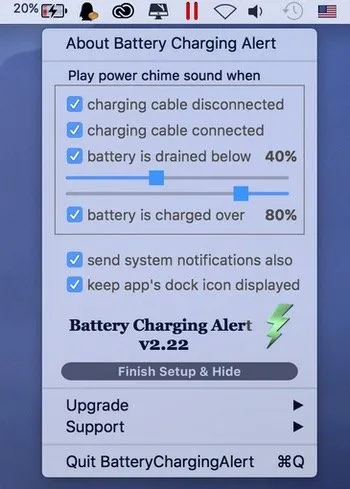
Battery Charging Alert monitors MacBook battery status and sends notifications for three key events: when the charging cable is plugged in, when it is unplugged, and when the battery reaches preset percentage levels. The app helps users develop healthier charging habits without constantly checking the battery icon.
The standout feature is customizable battery level alerts. Users can set two threshold notifications—one for when to plug in (e.g., 20%) and another for when to unplug (e.g., 80%). These thresholds align with battery expert recommendations for keeping lithium-ion batteries between 20% and 80% charge for optimal longevity, though modern battery management systems handle some of this automatically.
The app displays a colorful battery icon in the menu bar showing the current percentage, with the icon changing color based on battery level. When alerts trigger, standard macOS notifications appear with an optional iPhone-style charging chime sound. The alert sound can be customized or disabled entirely. Additional options include adjustable sliders for battery thresholds and toggle for dock icon visibility.
The current version (v3.41 as of July 2025) has been actively maintained by developer Jiulong Zhao, with recent updates including a SwiftUI migration and interface improvements. The app weighs 6.3 MB and collects no user data according to the privacy disclosure.
System requirements: macOS 11.0 or later. Supports both Intel and Apple Silicon Macs. Uses minimal system resources and integrates with macOS dark mode.
Limitations: At $12.99 (one-time), the pricing is premium for a notification tool. The app provides alerts only—it does not actively limit or control charging behavior.
Alternatives: AlDente offers charge limit controls that prevent the battery from charging past a set percentage. coconutBattery (free) provides detailed battery health monitoring. Both alternatives offer more proactive battery management features but require additional configuration.
Suitable for users who want simple, automated reminders to maintain healthy charging habits without needing advanced battery limiting features or extensive configuration.


