
Supaste
A visual clipboard history manager for macOS with MacBook notch shelf integration, smart grouping by type and app, screenshot saving, and local-first privacy.
- Price
- Paid
- Requires
- macOS 14 or later
- Runs on
- Apple Silicon / Intel
- Size
- Not Listed
- Around Since
- 2026
- Open Source
- No
- Last Checked
- Not Listed
($15 early access, one-time; regular price $29)
Facts from our directory entry. Check the publisher for current pricing and compatibility.
 1 screenshot
At a Glance
Best For
Browsing a visual clipboard and screenshot history from the notch.
The Catch
The $15 early-user licence covers one Mac, and the regular price is $29.
About Supaste
Supaste is a clipboard history manager for macOS that stores copied items in a visual timeline accessible from the menu bar. The app captures text, images, colors, files, and screenshots automatically and organizes them into browsable history with a keyboard shortcut (Control + Command + V) for quick retrieval. ($15 early access, one-time; regular $29)
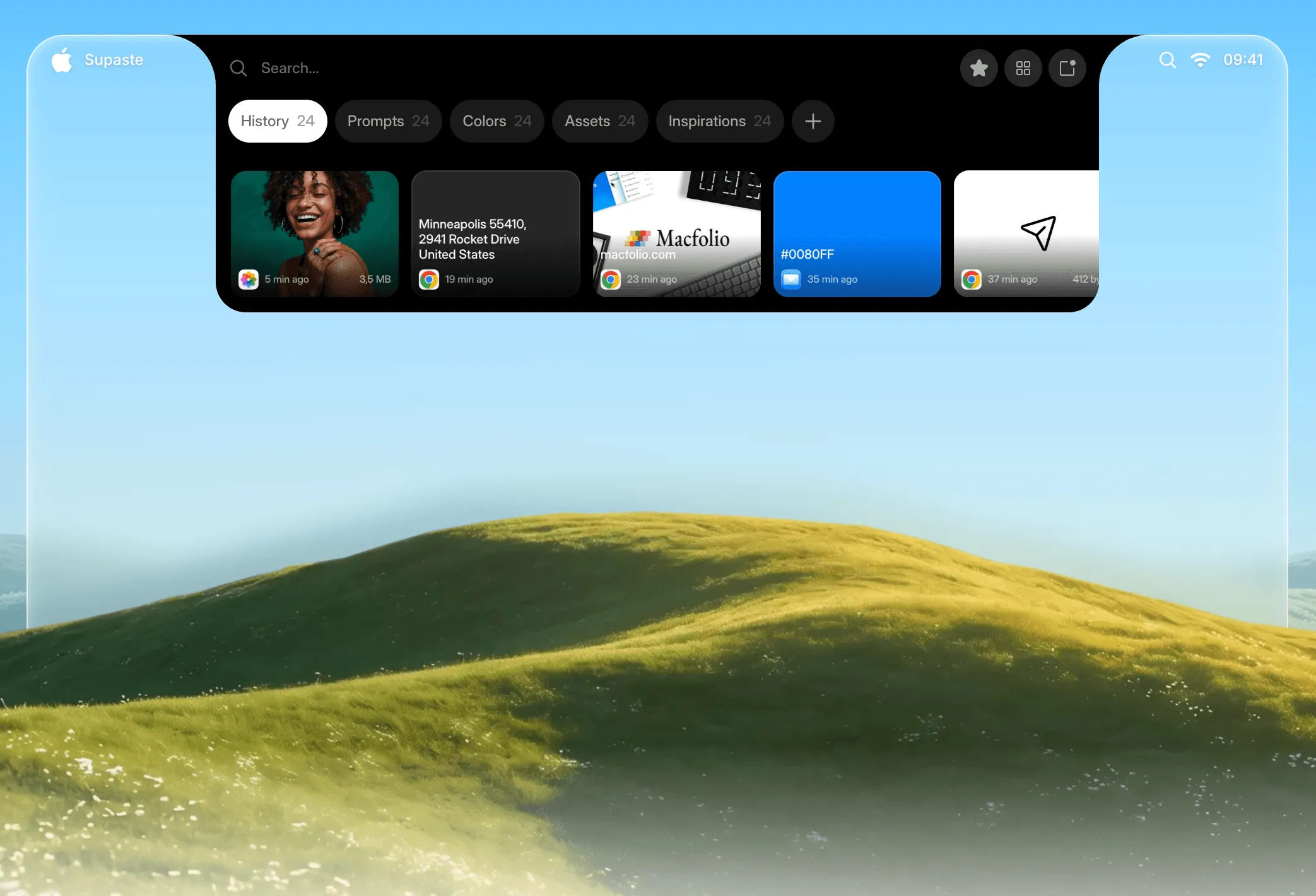
The visual history displays clipboard items with previews, supporting multi-select operations for copying several items simultaneously. Smart grouping organizes entries by content type, source application, or custom category, reducing time spent searching through mixed clipboard entries. A quick search field filters the history by content or application name.
A notable feature is MacBook notch shelf integration, which provides a secondary access point for clipboard history in the notch area on compatible MacBook models, offering quick access without opening the main panel. Inline paste inserts content without switching to the source application. Drag-and-drop support allows clipboard items to be moved directly to accepting applications.
Screenshot saving extends the tool beyond text and files: captured images appear in the clipboard history alongside other content types and support OCR text extraction. Clip reminders surface items that were saved but not yet acted on. The app operates locally with no cloud sync requirement, and automatic sensitive content detection flags items that may contain passwords or credentials.
System requirements: macOS Sonoma 14.0 or later. Available via direct download at supaste.com (not on Mac App Store). One-time purchase.
Pricing: ($15 early access, one-time; regular price $29)
Limitations: macOS Sonoma 14.0 minimum excludes users on older systems. Not available on the Mac App Store. Notch shelf integration is specific to MacBook models with a notch; desktop Mac users do not benefit from this feature. No iCloud or cross-device sync.
Alternatives: Pastebot ($9.99, one-time) provides clipboard management with rule-based transformations. Clipboard Manager by Fiplab offers basic history at lower cost. CopyClip (free) covers lightweight history without visual organization or smart grouping.
Suitable for users who work with large volumes of copied text and images, benefit from visual clipboard organization, and prefer a one-time purchase over subscription-based alternatives.
FAQ
What does Supaste do?+
Supaste captures and stores clipboard history in a visual timeline accessible from the macOS menu bar. It organizes copied text, images, files, and screenshots by type, app, and custom category, with quick search and inline paste via Control + Command + V.
Is Supaste free?+
No. Supaste is a paid app with a one-time purchase. Pricing is $15 during the early-access period (regular price $29). There is no subscription.
How do I install Supaste on macOS?+
Download Supaste directly from https://www.supaste.com/. The app is not available on the Mac App Store and requires macOS Sonoma 14.0 or later.
Does Supaste run on Apple Silicon?+
Yes. Supaste runs on Apple Silicon (M1, M2, M3, M4) and Intel Macs running macOS Sonoma 14.0 or later.
Does Supaste store clipboard data locally or in the cloud?+
Supaste is local-first: all clipboard history is stored on the device. The app includes automatic sensitive content detection to flag potentially private items and operates entirely offline.
What is the MacBook notch shelf feature in Supaste?+
The notch shelf integration provides a secondary access point for clipboard history in the MacBook notch area, allowing quick access without opening the full menu bar panel.