
Toggle Music
A Mac menu bar music player for Apple Music and Spotify with 3D Cover Flow album carousel, full library search, and adaptive artwork-based color theming.
- Price
- Free
- Requires
- macOS 14 or later
- Runs on
- Not Listed
- Size
- 3.3 MB
- Around Since
- 2026
- Open Source
- No
- Last Checked
- 2026-10-31
Pay what you want, including zero, after a 7-day free trial; 14-day refund.
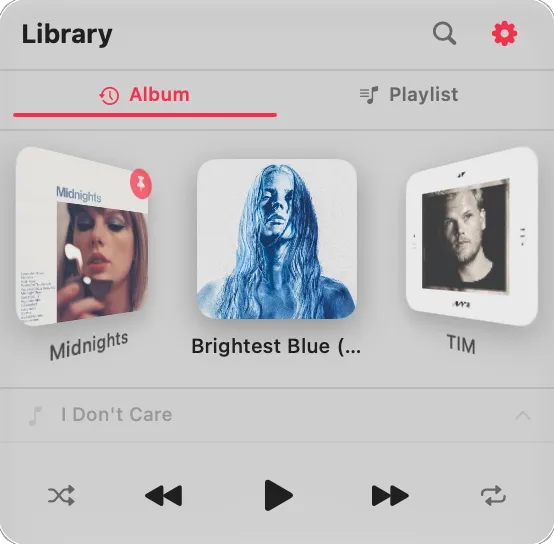
 1 screenshot
At a Glance
Best For
Browsing and playing Apple Music albums and playlists from the menu bar.
The Catch
Spotify support is limited to playback control; browsing and search stay in the Spotify app.
About Toggle Music
Toggle Music provides menu bar access to Apple Music and Spotify libraries through a frosted-glass dropdown panel, combining a 3D Cover Flow album carousel with full library search and playback controls. The app targets users who prefer browsing their music collection from the menu bar rather than switching to a full application. (Pay what you want)
The panel opens via menu bar click and offers two browsing modes: a 3D Cover Flow view that scrolls through album art in a carousel format, and a grid view for denser library navigation. Full library search covers songs, albums, and playlists from both services. Now Playing display adapts its color scheme dynamically to match the dominant colors in the current album artwork, providing visual context tied to the playing track.
Queue management for Apple Music supports Shift-click to add tracks to the Up Next queue without disrupting the current session. Pinned favorites replicate Apple Music’s native pins feature for quick access to frequently played content. Service switching between Apple Music and Spotify is available within the app without reopening a separate application.
Spotify integration supports both Free and Premium accounts, with playback controls adjusting to the capabilities of each account tier.
System requirements: macOS 14 Sonoma or later. Apple Silicon required (Intel Macs not supported). Pay what you want, including zero, after a 7-day free trial; one purchase unlocks every Mac you own. 14-day refund on the amount paid. Available via the developer’s website, not the Mac App Store.
Pricing: Pay what you want; the licence is included at any amount, including zero.
Limitations: Apple Silicon only — Intel Mac users are excluded entirely. Purchases go through the developer’s website, not the Mac App Store. No support for other music services (Tidal, YouTube Music, Deezer).
Alternatives: MusicBox saves music links for later listening without playback controls. Spotify and Apple Music native menu bar mini-players offer basic now-playing status. Marvis Pro provides deeper Apple Music library management as a standalone app.
Suitable for Apple Silicon Mac users who subscribe to Apple Music or Spotify and want to navigate their music library from the menu bar without keeping a full music application open.
FAQ
What does Toggle Music do?+
Toggle Music adds a frosted-glass panel to the Mac menu bar with a 3D Cover Flow album carousel and grid view for Apple Music and Spotify. It supports library search, now-playing display with adaptive album artwork colors, queue management, and service switching between Apple Music and Spotify.
Is Toggle Music free?+
Toggle Music is pay what you want: the licence is included at any amount, including zero, after a 7-day free trial. It is available directly from the developer's website, one purchase unlocks every Mac you own, and a 14-day refund applies to the amount paid.
How do I install Toggle Music on macOS?+
Download Toggle Music from https://www.besianshala.com/catalog/toggle-music. A direct .dmg is also available via GitHub releases at https://github.com/besianshala23/toggle-music-releases/releases/latest/download/Toggle-Music.dmg. Requires macOS 14 Sonoma and Apple Silicon.
Does Toggle Music run on Apple Silicon?+
Toggle Music requires Apple Silicon. Intel Mac users are not supported. The app requires macOS 14 Sonoma or later.
Can Toggle Music control Spotify Free accounts?+
Yes. Toggle Music integrates with both Spotify Free and Spotify Premium accounts, with playback controls adapting to the account tier. Both Apple Music and Spotify can be accessed from within the same interface with service switching available.