
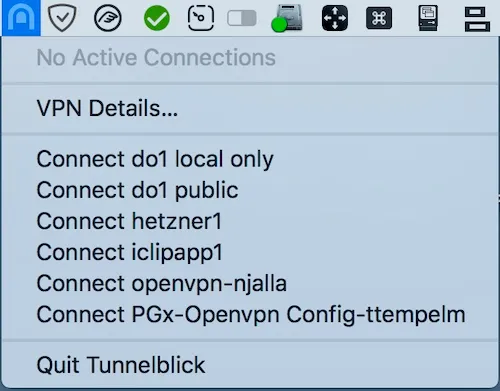
Tunnelblick is a free, open-source OpenVPN client for macOS that manages VPN connections from the menu bar using standard configuration files. (Free, open-source)
The application bundles OpenVPN, easy-rsa, and tun/tap drivers into a single package, eliminating the need for separate component installation. Users supply their own .ovpn configuration files — obtained from a VPN provider or a self-hosted OpenVPN server — and Tunnelblick handles connection management, reconnection on network changes, and status display in the menu bar. Multiple configurations can be loaded simultaneously, allowing quick switching between different VPN profiles or servers.
The menu bar icon reflects the current connection state: a closed tunnel when disconnected and an open tunnel when a VPN is active. Clicking the icon presents a list of loaded configurations, connection status, and options to connect or disconnect. Advanced settings include split tunneling options, DNS configuration, and automatic connection triggers when joining specific networks.
Tunnelblick maintains no logs of user activity, collects no telemetry, and contains no advertising or affiliate links. It is licensed under the GNU General Public License version 2 and the source code is available for review on GitHub.
System requirements: macOS 13 Ventura or newer. Direct download only (not on the Mac App Store). No specific app size listed; installer is a standard .dmg.
Pricing: (Free, open-source — GPL-2.0)
Limitations: Tunnelblick supports only the OpenVPN protocol; it does not support WireGuard, IKEv2, L2TP, or other VPN protocols. Users must obtain and manage their own configuration files, which requires some technical familiarity. There is no built-in kill switch in the traditional sense, though DNS leak prevention options exist in settings. The current release requires macOS 13 or newer, excluding users on older systems.
Alternatives: Viscosity ($14, one-time) offers a polished OpenVPN client with more UI refinement and per-connection statistics. OpenVPN Connect (free) is the official client from OpenVPN Technologies with a more guided setup experience. Passepartout (free, open-source) supports both OpenVPN and WireGuard protocols and is available on the Mac App Store.
Suitable for users who need a no-cost, privacy-focused OpenVPN client and are comfortable managing their own VPN configuration files.


