
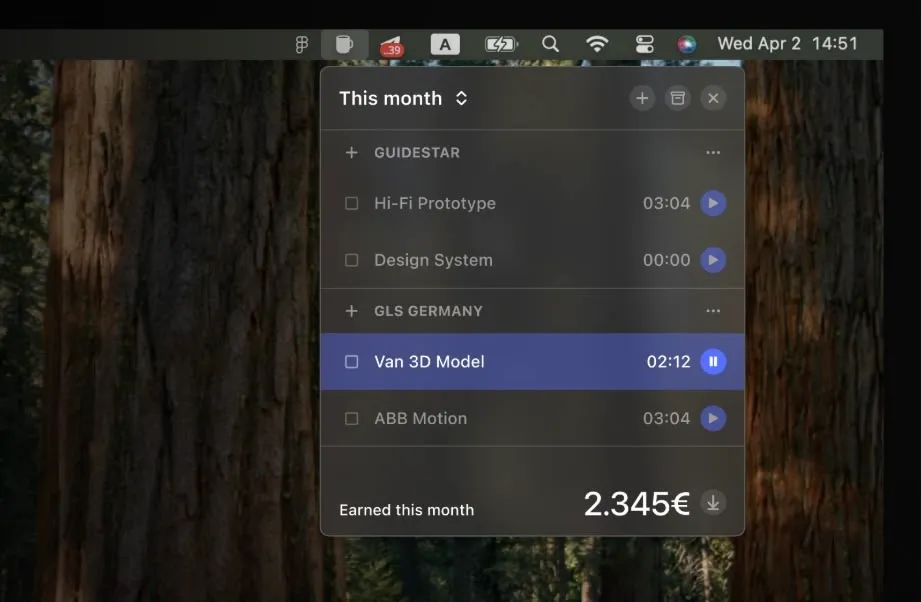
Daily Grind is a menu bar time tracker built specifically for freelancers who need straightforward billable hour tracking without project management overhead. The app follows a “less features, more focus” philosophy, providing core time tracking functionality in an offline-first design.
The app organizes work by client and task. Users can create tasks, assign them to specific clients, set hourly rates, and track earnings in real-time. The menu bar dropdown displays the current session, monthly earnings totals, and a breakdown of time spent across clients and projects. Completed tasks can be marked with one click, and all tracked hours export to CSV for integration with invoicing workflows.
All data remains local on the Mac with no cloud accounts or syncing required. This offline-first approach eliminates privacy concerns about client data and enables time tracking without internet connectivity. The app requires only basic menu bar access permissions.
The interface prioritizes simplicity over feature breadth. Daily Grind deliberately excludes project management, team collaboration, and elaborate reporting dashboards found in enterprise time tracking solutions. The focus remains on individual freelancer needs: tracking hours, organizing by client, and exporting for billing.
System requirements: macOS (specific version requirements available on App Store listing). Available via Mac App Store as a paid app.
Limitations: The app lacks features that larger teams or complex projects may require: no team collaboration, no integrations beyond CSV export, no automatic time tracking or idle detection, and no cross-device sync. Pricing details are not prominently displayed on the developer website.
Alternatives: Toggl Track offers free tier with more integrations and cross-platform sync. Harvest provides invoicing integration for freelancers needing end-to-end billing. Timing offers automatic time tracking for users who prefer passive monitoring.
Suitable for users who work as solo freelancers tracking billable hours across multiple clients and prefer offline-first tools without subscription fees or cloud dependencies.


