
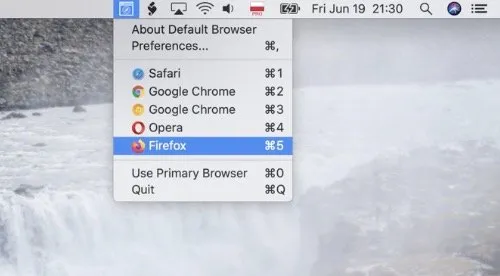
DefaultBrowser is a menu bar utility that routes external links to whichever browser was most recently used, rather than a fixed system default. ($0.99, one-time)
When an external link is clicked — from Mail, documents, or any other app — DefaultBrowser opens it in the last-used browser automatically. This eliminates the friction of manually switching the system default in macOS Settings when alternating between browsers throughout the day. The menu bar icon displays the currently active browser at a glance.
Keyboard shortcuts accessible from the menu bar enable instant browser switching without opening any preference pane. A blocklist feature allows specific browsers to be excluded from automatic selection, useful for keeping developer or testing browsers out of normal browsing rotation. Users who prefer a consistent routing target can configure the app to always use a designated browser, replicating traditional single-default behavior.
All link routing runs locally with no data sent off-device. The source code is available on GitHub, allowing inspection of the routing logic. The app is 434.8 KB and adds no measurable overhead to the menu bar.
System requirements: macOS 10.15 Catalina or newer. Available on the Mac App Store. App size is 434.8 KB.
Pricing: ($0.99, one-time)
Limitations: Routes only external links opened from other apps; does not support per-domain or per-URL browser rules. No browser profile targeting for setups using multiple Chrome or Firefox profiles. Requires a one-time purchase; the open-source GitHub version requires manual build from source.
Alternatives: Choosy ($10 one-time) offers per-domain and per-URL routing rules for more granular control. Browserosaurus (free, open-source) prompts the user to choose a browser on every external link. The built-in macOS default browser setting handles simple single-browser workflows without additional software.
Suitable for users who regularly switch between two or more browsers and want links to follow their current context automatically.


