
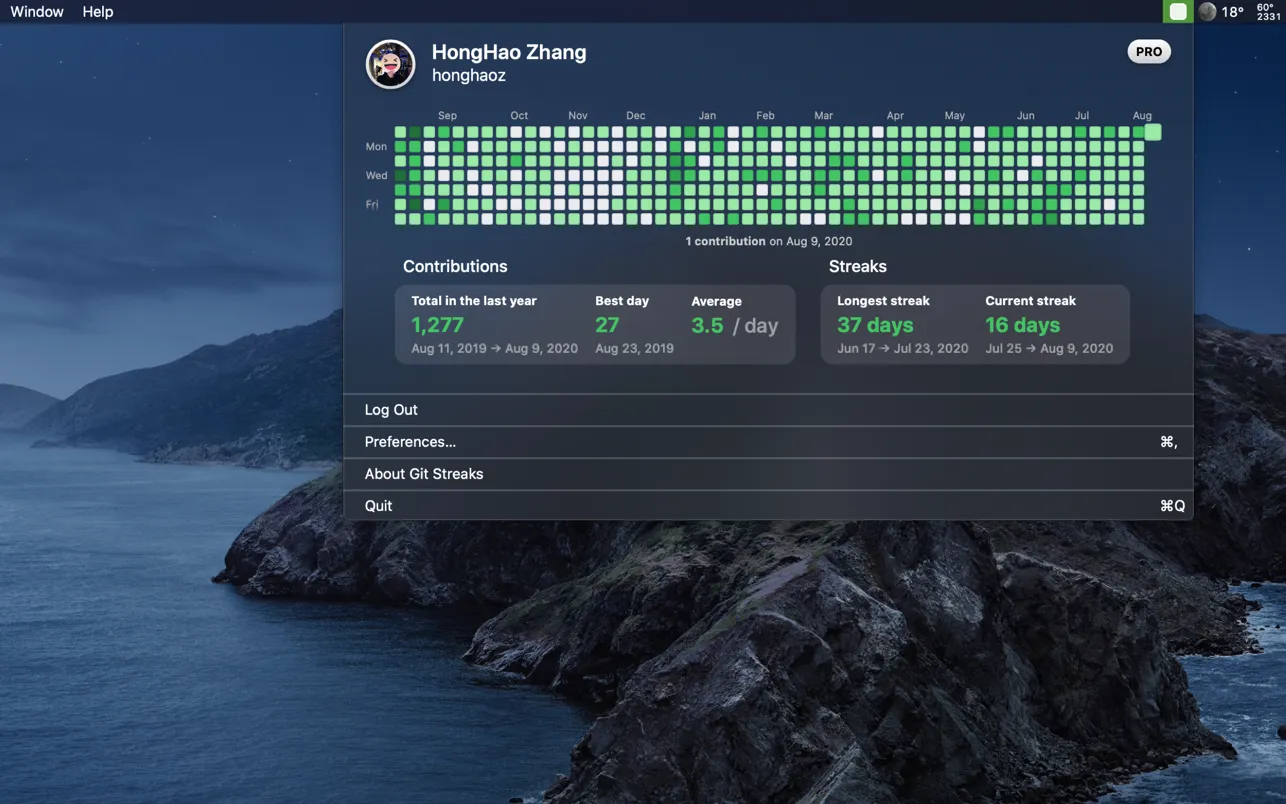
Git Streaks displays GitHub contribution metrics directly in the macOS menu bar, providing quick visibility into coding activity without opening a web browser. The app shows a real-time indicator of daily contribution status, reflecting whether commits have been made on the current day through the familiar GitHub green square visualization.
The menu bar interface presents a year-long contribution graph accessible with a single click. Users can view comprehensive statistics including total contributions, highest single-day count, and daily averages calculated over the past year. The app tracks both current and longest contribution streaks, making it straightforward to monitor consistency patterns. Hovering over specific days reveals exact contribution numbers for detailed activity review.
Git Streaks functions as a native macOS application rather than an Electron-based wrapper, resulting in compact file size (6.9 MB) and efficient system integration. The app operates exclusively from the menu bar without a Dock icon, minimizing visual clutter while maintaining quick access to GitHub metrics.
System requirements: macOS 11.0 or later. Compatible with Apple Silicon (M1 and newer) Macs. Requires a GitHub account for authentication.
Pricing: Free on the Mac App Store.
Limitations: The minimum auto-update interval of one minute may generate unnecessary API calls and background activity for users who prefer less frequent synchronization. The app provides contribution visibility but does not support direct interaction with GitHub repositories or commit management. Users requiring deeper GitHub integration should consider dedicated Git clients.
Alternatives: Streaker offers cross-platform GitHub streak tracking with reminder notifications. GitBar provides open-source GitHub contribution stats in the menu bar. Users seeking full repository management should consider GitHub Desktop or command-line Git workflows.
Suitable for developers who prioritize maintaining GitHub contribution streaks and prefer at-a-glance visibility of coding activity patterns without switching to a browser-based GitHub profile view.


