
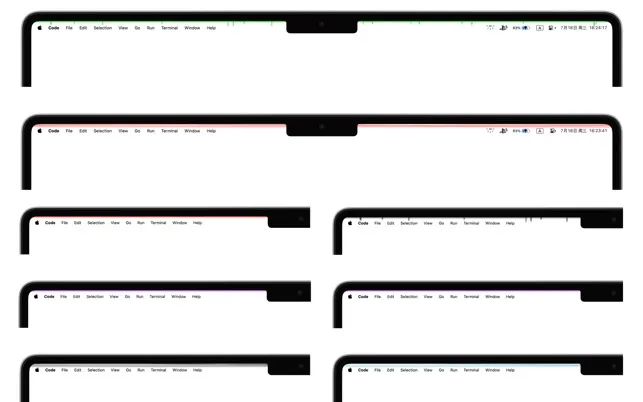
HaloStrip creates dynamic light bands below the Mac menu bar, adding customizable animated lighting effects to the desktop. The app transforms the space beneath the menu bar into an ambient lighting canvas without consuming menu bar item space.
Three distinct lighting modes are available. Classic Mode displays solid colors with clean simplicity suited for professional environments. Spiky Mode generates random light spikes extending from the main band for a more dynamic appearance. Wave Mode produces flowing patterns inspired by atmospheric effects in “Death Stranding,” creating a futuristic ambient aesthetic.
Full color customization allows users to match lighting to wallpapers, moods, or project themes. The effects are designed to be noticeable without being distracting, adding visual interest while maintaining the clean macOS aesthetic.
Built with SwiftUI, the app is lightweight at approximately 454 KB and integrates natively with macOS. Resource usage is minimal with no measurable impact on battery life or system performance. The developer collects no user data—all preferences remain local.
The interface prioritizes simplicity over configuration depth. Users select a lighting mode, customize colors, and the app runs in the background. Multiple language support includes Japanese, Korean, and Simplified Chinese.
System requirements
- macOS 13 (Ventura) or later
- Compatible with Apple Silicon and Intel Macs
- Available on Mac App Store (Free)
Limitations
- No scheduling or automatic mode switching based on time or app
- Effects appear only below the menu bar, not customizable positioning
- No integration with other ambient lighting systems or external displays
- Limited animation customization beyond mode selection
Alternatives
- Lively Wallpaper - Animated wallpapers (Windows, though similar concept)
- Custom wallpapers with built-in ambient elements
- Dynamic Wallpaper Club - Time-shifting wallpapers for macOS
Suitable for users who want subtle desktop personalization without complex theming systems or significant system resource overhead.


