
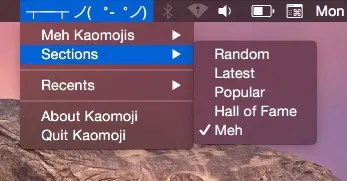
Kaomoji is a Mac menu bar utility that provides one-click access to kaomojis—Japanese-style ASCII emoticons such as (╯°□°)╯︵ ┻━┻—directly from the status bar. (Free)
The app organizes its library into three browsable collections: random, popular, and latest. Users click the menu bar icon to open a dropdown, select a kaomoji, and it copies to the clipboard automatically. A notification appears upon each successful copy, eliminating the need to manually verify the action. The interaction model is entirely mouse-driven, requiring no keyboard shortcuts or configuration.
The status bar displays a kaomoji icon as a persistent visual reminder. Kaomoji sources its content from emojicons.com, drawing from a community-curated library. The interface stays intentionally minimal—no settings panel, no search field, and no customization options—keeping the app focused on fast access and clipboard delivery.
Version 1.0.3, released in February 2023, added native Apple Silicon compatibility. Developer Calvin Hill keeps the app lightweight at 1.8 MB with no data collection and no in-app purchases.
System requirements: macOS 10.8 Mountain Lion or later. App size: 1.8 MB. Available on the Mac App Store.
Pricing: (Free)
Limitations: No search functionality within the kaomoji library, making it difficult to locate specific emoticons by character or description. The collection is sourced exclusively from emojicons.com with no support for custom additions. The app covers ASCII/text-art kaomojis only and does not include Unicode emoji. Feature scope has remained unchanged since initial release aside from Apple Silicon compatibility.
Alternatives: Rocket (freemium emoji and kaomoji picker triggered via keyboard shortcut with search), the built-in macOS emoji picker (Command+Control+Space, no separate install required), or Rocket Typist (text expansion tool with emoji support built in).
Suitable for users who frequently use kaomojis in text communications and want instant clipboard access from the menu bar without switching applications or memorizing keyboard shortcuts.


