
I recently found myself in a situation that probably sounds familiar. I was running a long backup to an external drive, stepped away to grab coffee, and came back to find my Mac asleep with the backup paused. Not a disaster, but annoying enough to make me think there had to be a better solution than constantly adjusting Energy Saver settings.
KeepingYouAwake solves this exact problem with an elegantly simple approach. The app lives in your menu bar and prevents your Mac from sleeping for a set duration or indefinitely until you turn it off. What makes it particularly appealing is its heritage - it’s inspired by Caffeine, the beloved utility that many Mac users relied on for years before it stopped being maintained.
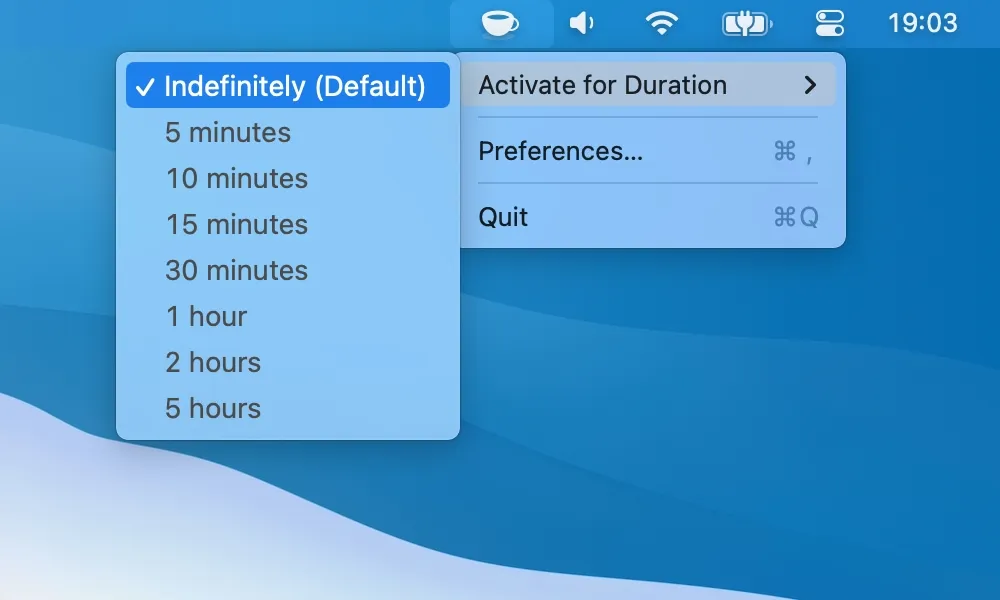
The functionality is straightforward in the best possible way. Click the menu bar icon to activate it, and your Mac stays awake. Click again to deactivate. You can set predefined durations (5 minutes, 10 minutes, 1 hour, or indefinitely) or customize your own intervals. The icon changes state to show whether it’s active, giving you clear visual feedback without requiring any thought.
I’ve been using KeepingYouAwake on my Mac Mini M4 for the past few weeks, primarily when running long downloads or system maintenance tasks that I don’t want interrupted. The app wraps Apple’s native caffeinate command-line utility, which means it’s using official macOS functionality rather than any hacky workarounds. This approach keeps it lightweight and reliable - I measured roughly 50MB of memory usage with negligible CPU impact.
One important limitation to understand upfront: KeepingYouAwake won’t work with closed MacBook lids. This is by design, not a bug. The developer explains that preventing sleep on closed-lid Macs creates thermal concerns, and macOS itself prevents this behavior for safety reasons. If you need your MacBook to run processes with the lid closed, you’ll need a different solution. For desktop Macs or open-lid laptops, though, it works perfectly.
The app is completely free and open-source, licensed under MIT. Developer newmarcel maintains it on GitHub with 31 contributors having helped over the years. The repository has over 6,000 stars, suggesting a healthy community of users who find it valuable. What I appreciate most is the transparency - you can review the source code yourself, build it from scratch if you want, or simply download the prebuilt version.
System requirements are modest. KeepingYouAwake supports macOS 10.13 High Sierra and newer, making it compatible with virtually any Mac still in active use. Earlier versions exist for older macOS releases if you’re running legacy hardware. Installation is simple through direct download or via Homebrew with brew install --cask keepingyouawake.
The app includes some nice quality-of-life features beyond basic sleep prevention. You can configure it to launch at login, customize the menu bar icon appearance, and set keyboard shortcuts for quick activation. The preferences are minimal and clear, avoiding the feature creep that often plagues utility apps.
For users managing remote work across different time zones, KeepingYouAwake provides peace of mind during long-running tasks. When I’m syncing large files or running system maintenance that might take hours, I don’t have to worry about my Mac sleeping in the middle of the process. The timer function is particularly useful - set it for however long you expect the task to take, and it automatically deactivates when done.
One minor consideration: if you have a particularly crowded menu bar, the icon takes up a spot like any other utility. It’s a small, simple icon that doesn’t demand much space, but it’s worth mentioning for users who carefully curate their menu bar real estate.
The development history is reassuring. The project has been actively maintained since 2014, with regular updates that add polish and maintain compatibility with new macOS versions. Version 1.6.8 is the latest release as of writing, showing ongoing commitment rather than abandonment. The GitHub issues page shows responsive developer engagement with user reports.
For anyone who needs occasional sleep prevention without enterprise features or complexity, KeepingYouAwake hits the sweet spot. It’s not trying to be a comprehensive power management suite. It does one thing well, uses official Apple APIs to do it safely, and stays out of your way the rest of the time. The open-source nature means you’re not trusting a black box with system-level access, and the active maintenance suggests it will continue working for years to come.
If you’ve ever interrupted a long-running task because your Mac went to sleep, or if you simply want a modern replacement for the old Caffeine utility, KeepingYouAwake deserves a permanent spot in your menu bar.