
MeetingMenu is a menu bar utility for managing video calls and meetings on macOS, consolidating pre-meeting checks, one-click launches, and in-meeting controls into a single menu bar interface. ($9.99, one-time)
The app displays a countdown timer to the next scheduled meeting directly in the menu bar, along with the meeting title as a reminder. One-click launch buttons support nine platforms: Zoom, Microsoft Teams, Google Meet, Slack, Webex, Skype, GoToMeeting, BlueJeans, and Jitsi Meet. Time zone management helps users working with distributed teams keep track of meeting times across regions.
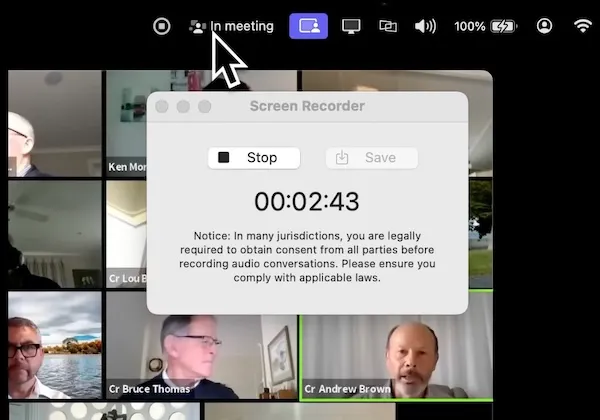
Pre-meeting preparation tools include a live camera preview for appearance checks, audio quality testing, WiFi signal strength verification, and controls for speaker volume, microphone volume, and audio output device switching. These checks run without opening any conferencing app, reducing the setup time before calls. Screen recording is available during meetings for note or recap purposes.
Privacy-focused features allow users to hide desktop icons, conceal the current wallpaper, and hide open application windows before sharing a screen—useful for preventing accidental exposure of personal or confidential content. A private browsing mode is also available for confidential web activity during meetings. An in-meeting indicator in the menu bar signals to others nearby that a call is active.
System requirements: macOS 12.0 Monterey or later. Runs on Apple Silicon and Intel Macs. Available on the Mac App Store (9.9 MB).
Pricing: ($9.99, one-time) via Mac App Store. No subscription fees.
Limitations: Calendar integration relies on the meetings already being in the system calendar; there is no built-in scheduling or calendar management. The app does not record audio separately from screen recording. The WiFi signal check is a general strength indicator, not a bandwidth test. No companion iOS app.
Alternatives: Meeter (free tier available, similar one-click meeting launch focus), Fantastical (comprehensive calendar with meeting join links, subscription), Camo (dedicated camera preview and enhancement, $39.99/year).
Suitable for users who attend frequent video meetings across multiple platforms and want centralized pre-call checks, quick launch access, and privacy controls without switching between separate applications.


