
Patter
Ambient sound mixer with 17 layered sounds — rain, coffee shop, white noise — for focus and relaxation from the Mac menu bar.
- Price
- Paid
- Requires
- macOS 13 or later
- Runs on
- Apple Silicon / Intel
- Size
- 39 MB
- Around Since
- 2026
- Open Source
- No
- Last Checked
- 2026-10-31
($9.99, one-time) — single purchase on the Mac App Store; all features and sounds included permanently with no subscription.
 1 screenshot
At a Glance
Best For
Mixing rain, café and noise layers into a focus backdrop.
The Catch
The library is fixed at 17 sounds, and the Mac version runs only from the menu bar.
About Patter
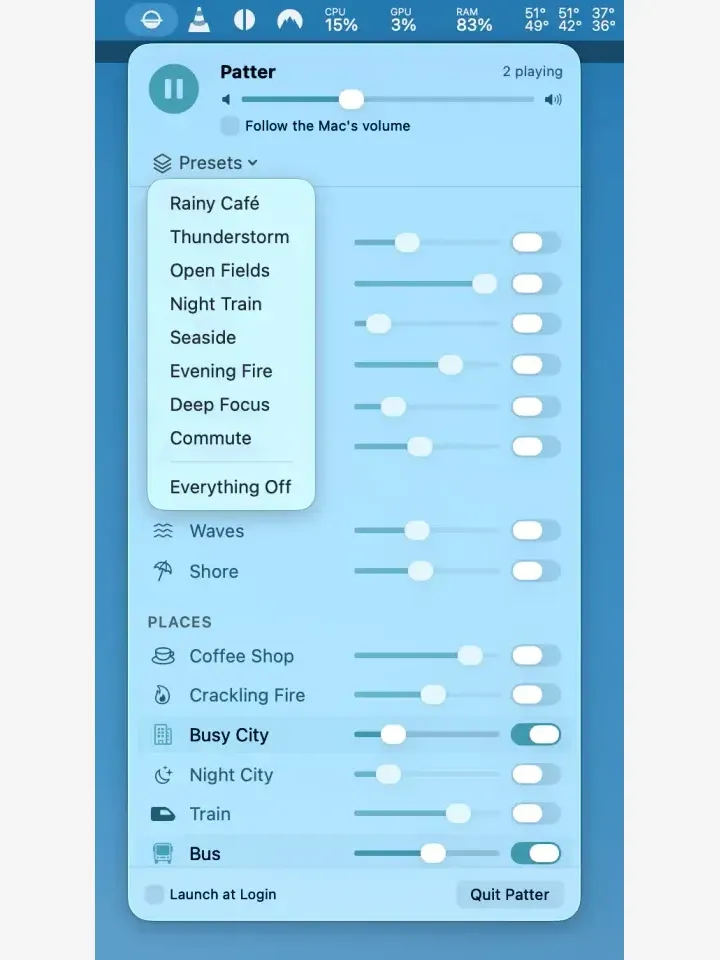
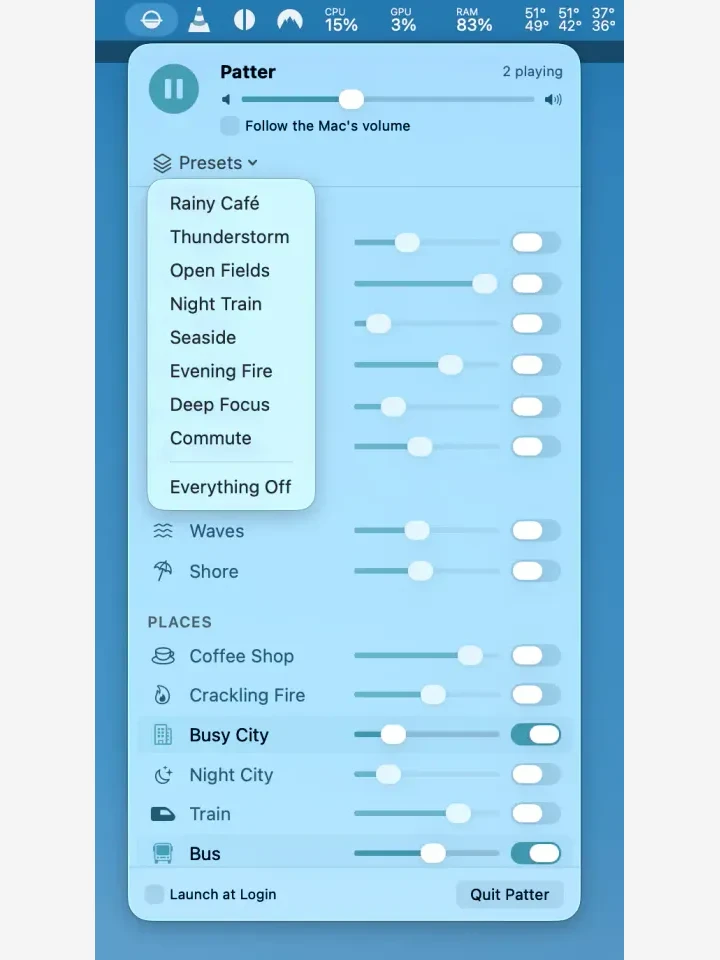
Patter is a Mac menu bar ambient sound mixer that layers 17 sounds — rain, coffee shop, waves, thunder, forest, white noise, and more — into a customizable acoustic backdrop for focus or relaxation. ($9.99, one-time)
The sound library spans four categories: six nature sounds (rain, thunder, wind, forest, morning, meadow), two water sounds (waves, shore), six place sounds (coffee shop, fire, busy city, night city, train, bus), and three generated noise types (white, pink, brown). Each sound plays in a seamless loop with no audible break points. Volume levels for each layer are adjusted independently, and the resulting mix can be saved as a named preset. Eight built-in presets cover common scenarios — Rainy Café, Thunderstorm, Seaside, Deep Focus among them — providing a starting point for users who prefer ready-made combinations.
A sleep timer runs up to 90 minutes with a fade-out transition, useful for relaxation sessions or blocking distracting office sounds. The app operates entirely offline; all sounds are stored on-device and the developer’s privacy policy states no network connections are made and no data is collected. Patter also ships as a companion app for iPhone, iPad, Apple Watch, and Android, with Apple Watch playback stored fully on-device.
System requirements: macOS 13 Ventura or later; universal binary (Apple Silicon and Intel). App size is approximately 37.5 MB.
Pricing: ($9.99, one-time) — single purchase on the Mac App Store; all features and sounds included permanently with no subscription.
Limitations: Sleep timer maximum is 90 minutes, which may not suit users who want all-day background sound. Some audio output configurations do not report volume levels to the app. No trial or free tier is available before purchase.
Alternatives: Noizio ($9.99, one-time) offers a similar layered ambient sound approach with a larger library; Lungo + Noisli (web-based subscription) provides ambient sound alongside browser accessibility; Dark Noise ($9.99, one-time on iOS/macOS) covers overlapping sound categories with an animated icon.
Suitable for users who work in open offices or noisy environments and want offline, one-time-purchase ambient sound control from the Mac menu bar.
FAQ
What does Patter do?+
Patter is a Mac menu bar ambient sound mixer that blends up to 17 layered sounds — including rain, coffee shop, waves, and generated white, pink, and brown noise — to create a custom acoustic environment for focus or relaxation.
Is Patter free?+
No. Patter is a one-time purchase of $9.99 on the Mac App Store (id 6798621203). There is no subscription, no in-app purchases, and no premium tier — all 17 sounds and features are included in the base price.
How do I install Patter on macOS?+
Download Patter from the Mac App Store (id 6798621203) or via the link at hearpatter.com. Patter requires macOS 13 Ventura or later and runs as a menu bar app without a persistent window.
Does Patter run on Apple Silicon?+
Yes. Patter is a universal app that runs natively on Apple Silicon (M1, M2, M3, M4) and Intel Macs.
Where are Patter sounds stored — are they streamed or on-device?+
All 17 sounds are stored on-device and played locally with no network access required. The developer's privacy policy states that Patter collects nothing and makes no outbound connections.
Can I save custom sound mixes in Patter?+
Yes. Patter supports named preset rooms. Eight built-in presets are included (Rainy Café, Thunderstorm, Open Fields, Night Train, Seaside, Evening Fire, Deep Focus, Commute), and users can save their own custom mixes at any volume ratio.