
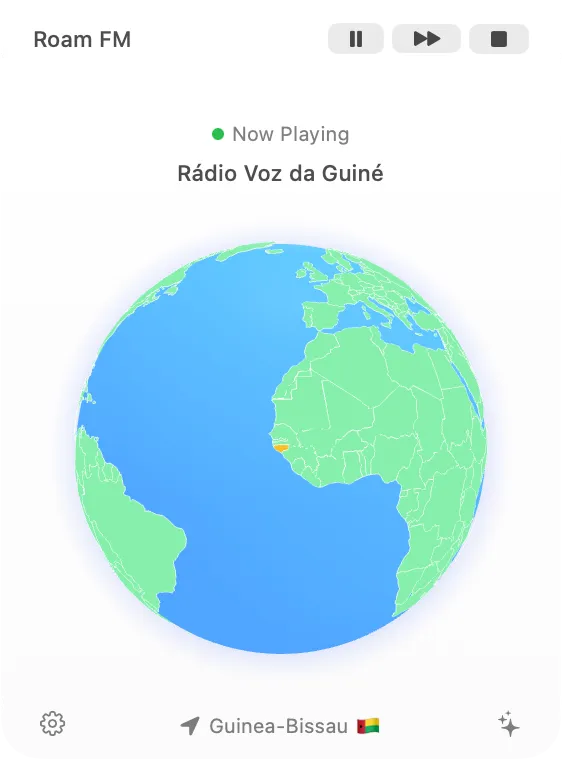
Roam FM provides randomized internet radio discovery from over 40,000 stations across 200+ countries directly from the Mac menu bar. Rather than requiring users to browse through endless lists organized by country or genre, the app starts with random selection for serendipitous discovery.
The app includes automatic language filtering that skips stations broadcasting in languages the user already understands, increasing the likelihood of genuinely new discoveries. A 3D globe visualization highlights each station’s geographic location, providing visual context that transforms passive listening into active exploration.
Key features include one-click instant playback, automatic station skipping for familiar languages, and a minimal menu bar interface. The app sources its station database from the open-source Radio Browser API, ensuring access to a constantly updated collection of streams worldwide.
At approximately 10MB, Roam FM maintains a lightweight footprint. The 3D globe feature works optimally on macOS 15 or later, though core radio functionality remains available on older versions. The app runs locally without requiring an account, enabling immediate use after installation.
Pricing follows a freemium model with basic functionality available free and a Pro version offered as a one-time lifetime purchase through Gumroad. Installation is handled through a .dmg file downloaded directly from the project’s GitHub releases page.
Limitations include variable stream quality depending on broadcasting stations and occasional offline streams, which reflects the global radio ecosystem rather than app functionality. The language filtering feature works well but automatic language detection presents inherent challenges.
Alternatives for internet radio include TuneIn Radio and Radio Garden, though these focus on traditional browsing rather than randomized discovery.
Suitable for users who enjoy stumbling onto unexpected music, want sonic snapshots of daily life in different parts of the world, or prefer discovery-based exploration over curated browsing.


