I run a few overnight tasks on my Mac occasionally—backup scripts, media conversions, things that take a while but don’t need my attention. The problem is remembering to put the Mac to sleep afterward. Leaving it running all night wastes power, but setting a reminder to manually sleep it later feels equally silly. SleepBar solves this specific problem with the kind of focused simplicity that makes you wonder why it isn’t built into macOS.
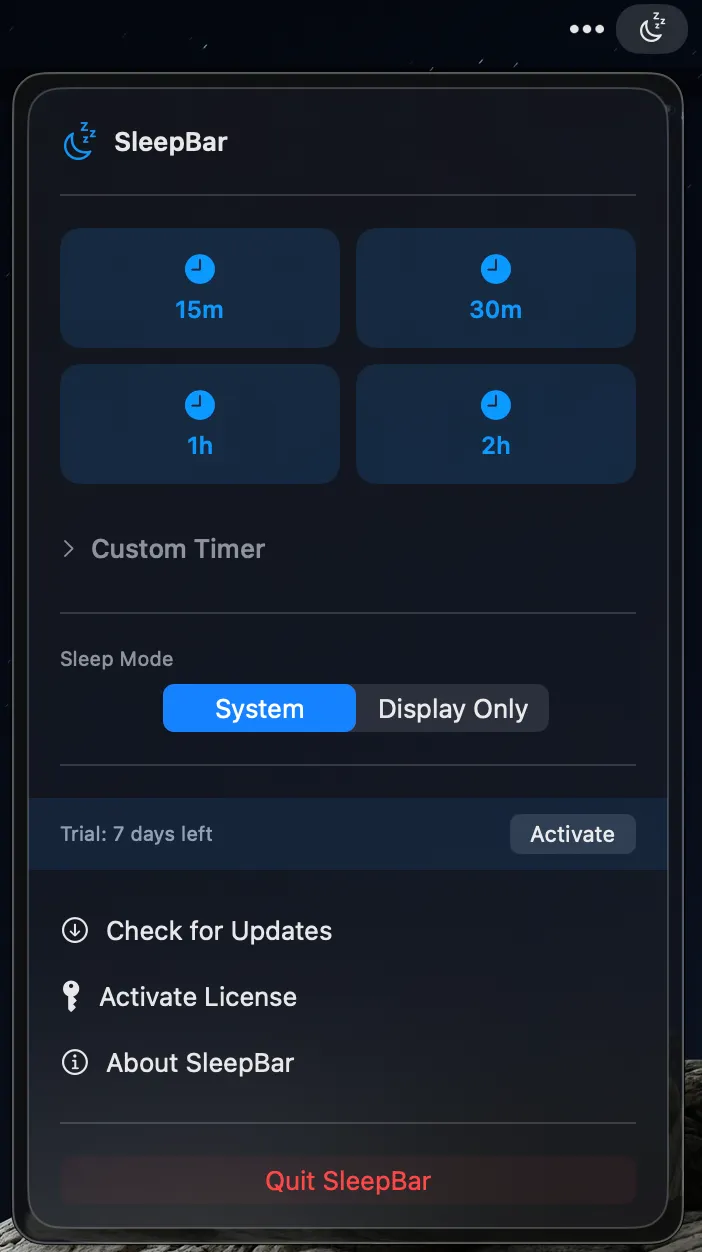
The app lives in your menu bar and does one thing: schedule when your Mac should sleep or when just the display should turn off. You get quick preset timers for 15, 30, 60, and 120 minutes, or you can set a custom duration with hours and minutes precision. What I find particularly useful is the ability to schedule sleep at a specific time—say, midnight or 2 AM—which is perfect for those overnight tasks where you know roughly when they’ll finish.
Before your Mac goes to sleep, SleepBar shows a notification one minute in advance with options to cancel or extend the timer. It’s a thoughtful touch that prevents the frustration of realizing your timer was about to trigger right when you sat back down at your computer. The app distinguishes between full system sleep and display-only mode, giving you control over exactly what you want to happen.
Developer Nate O’Farrell built SleepBar with Apple’s design principles in mind, and it shows. The interface feels native to macOS Sonoma and later, with what the developer calls “liquid glass design” that matches the system aesthetic. It’s not trying to reinvent interface conventions—it just fits in naturally.
The pricing is refreshingly straightforward: $4.20 for a lifetime license that works on up to three Macs, with all future updates included. There’s a 7-day free trial with no credit card required, which gives you enough time to integrate it into your workflow and see if you’ll actually use it. For reference, macOS does have built-in sleep scheduling in System Settings, but it’s buried in Energy settings and doesn’t offer the flexibility of quick timers or specific one-time schedules.
The app is open source and available on GitHub, which I appreciate for this kind of system utility. It requires macOS 14.0 or later, so if you’re still on an older version, you’re out of luck. But for anyone on Sonoma or newer who finds themselves manually putting their Mac to sleep at predictable times, SleepBar removes that small friction point.
This is the kind of utility that either solves a problem you have or doesn’t. If you’re already in the habit of letting your Mac sleep on its own schedule, you probably don’t need this. But if you run overnight tasks, want to limit screen time in the evenings, or just prefer having control over when your Mac sleeps without diving into System Settings, SleepBar is a well-executed tool that does exactly what it promises.