
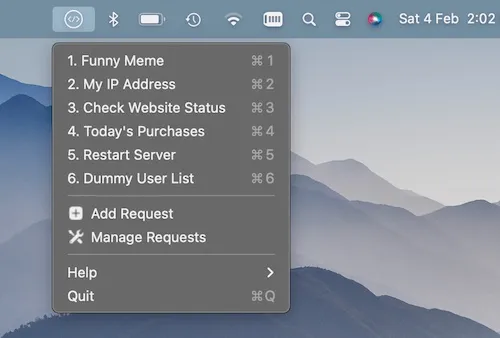
SnapAPI is a menu bar API management tool for macOS that enables developers to save and execute HTTP requests with a single click, without opening a full-featured HTTP client. (Freemium, $4.99/month)
The app stores named API requests in a menu bar dropdown, each configurable with GET, POST, or PUT methods. Response handling supports JSON, plain text, and image formats, with the result displayed inline after execution. Performance metrics—request duration and response size—accompany every response, providing basic diagnostic data at a glance.
A notable feature is Placeholder URL support, using {{double-brace}} syntax to define variable segments within a request URL or query parameters. Before executing a request, users can substitute these placeholder values without modifying the saved configuration. This approach reduces repetitive editing for APIs that require dynamic identifiers, environment-specific hostnames, or variable query strings.
The interface is intentionally minimal. Saved requests appear in the menu bar dropdown and execute with a click. Keyboard shortcuts handle common actions. At 2.4 MB, the app maintains a small footprint with low background resource usage.
System requirements: macOS 12.3 Monterey or later. Available on the Mac App Store (2.4 MB).
Pricing: (Freemium) Free tier includes up to 3 saved GET requests. Subscription ($4.99/month) unlocks unlimited requests, POST and PUT methods, and Placeholder URL functionality.
Limitations: The most recent update (version 1.1) was released in February 2023; ongoing development activity is unclear. The App Store listing has accumulated few ratings, making independent reliability assessment difficult. Free tier is restricted to GET requests and a maximum of 3 saved endpoints, which limits evaluation before committing to a subscription.
Alternatives: RapidAPI Desktop Client (free, comprehensive API testing with environment management); HTTPie Desktop (free, open-source HTTP client with a clean GUI); Proxyman (network debugging proxy with request inspection capabilities).
Suitable for developers who need rapid one-click API execution from the menu bar and find full HTTP clients like Postman or Insomnia excessive for quick, repetitive testing tasks.