
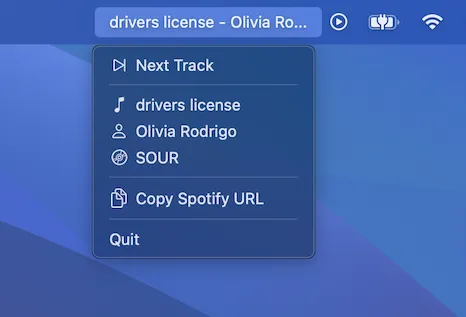
SoundSeer is a lightweight Mac menu bar app that shows the currently playing Apple Music or Spotify track, with track navigation controls and shareable link generation. ($0.99, one-time)
The app inserts itself into the menu bar and updates the display in real time as tracks change. Clicking the menu bar item opens a dropdown with the song title, artist, and album. Users can skip to the next track directly from the menu without switching to the music app.
A notable feature is the direct navigation: clicking the song title, artist name, or album opens that item in Apple Music or Spotify, providing quick access to the source content. A separate action copies a shareable URL for the currently playing track to the clipboard, useful for quickly sharing music recommendations in messages or social platforms.
The app’s source code is publicly available on GitHub under developer Jonathan Garelick’s account, with over 140 stars. SoundSeer is distributed through the Mac App Store.
System requirements: macOS 14 Sonoma or newer. App size is approximately 1.97 MB. Available for Mac App Store download.
Pricing: ($0.99, one-time) via Mac App Store.
Limitations: Track controls are limited to skip-forward only; there is no previous-track button. The app supports only Apple Music and Spotify — other streaming services such as Tidal, YouTube Music, or Deezer are not supported. The macOS 14 requirement excludes users on macOS 13 Ventura and older.
Alternatives: NepTunes (free, similar now-playing display with additional volume and brightness controls), Vinyls (free, vinyl-inspired Apple Music player with menu bar integration), or the built-in macOS Control Center Now Playing widget (free, basic playback controls without persistent menu bar song display).
Suitable for users who want a minimal, persistent view of their currently playing Apple Music or Spotify track in the menu bar alongside a quick way to share song links.


