Tokenscope is a free, open-source menu bar dashboard for macOS that monitors Claude Code token usage and associated API costs. The app reads local JSONL session logs without network access, telemetry, or account requirements. (Free, open-source)
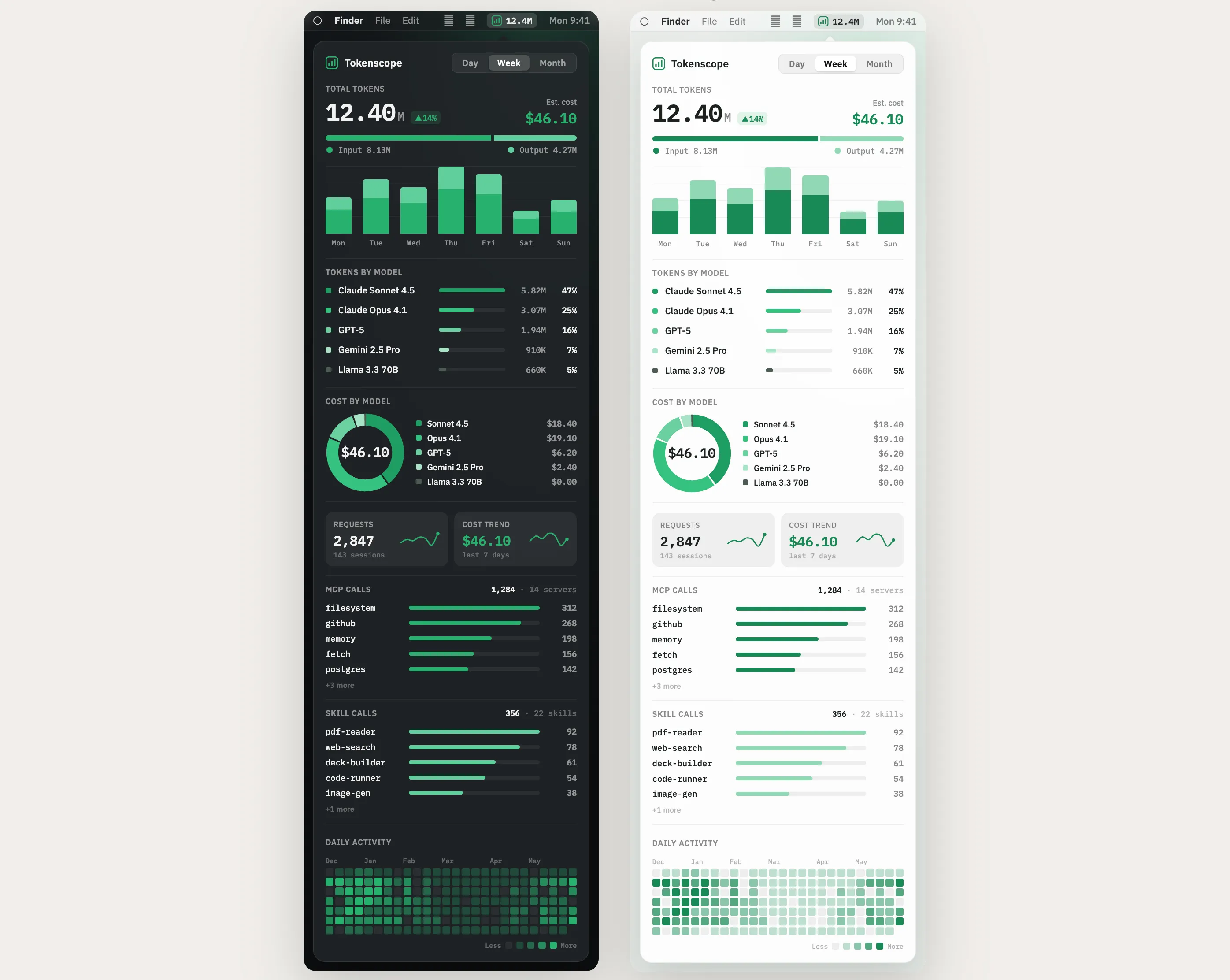
The menu bar widget displays real-time token consumption across active Claude Code sessions. Daily, weekly, and monthly usage breakdowns separate costs by AI model, covering Claude, GPT, Gemini, and Llama instances configured within Claude Code. Bar charts and donut charts visualize where compute spend is concentrated across each model tier, making it straightforward to identify high-cost sessions.
Cache analytics surface prompt cache hit rates for Claude sessions, helping identify optimization opportunities to reduce API costs. An MCP and skill monitoring panel shows which Model Context Protocol servers and custom skills are being invoked, providing visibility into tool call frequency. A twelve-month token usage heatmap, styled after GitHub’s contribution graph, provides a long-term view of Claude Code session patterns and intensity.
The privacy-first design reads data exclusively from ~/.claude/projects/ on the local machine. No data leaves the device, and no login or API key is required. Tokenscope is available via Homebrew or as a direct .dmg download from the GitHub releases page.
System requirements: macOS 14.0 Sonoma or later; Apple Silicon M1 or newer; Claude Code must be installed with existing session logs.
Pricing: (Free, open-source — MIT License)
Limitations: Requires Apple Silicon — Intel Macs are not supported. Only tracks usage from Claude Code sessions; standalone Claude.ai web usage is not captured. Requires Claude Code to generate JSONL log files before any metrics appear in the dashboard.
Alternatives: Claude Usage SysTray provides a simpler token indicator for Claude Code. The claude.ai usage dashboard shows API consumption at the account level. The CCUSAGE CLI tool offers command-line token reporting for Claude Code sessions.
Suitable for users who run Claude Code extensively and want detailed insight into token costs, model usage patterns, and cache efficiency without sending session data to external services.


