
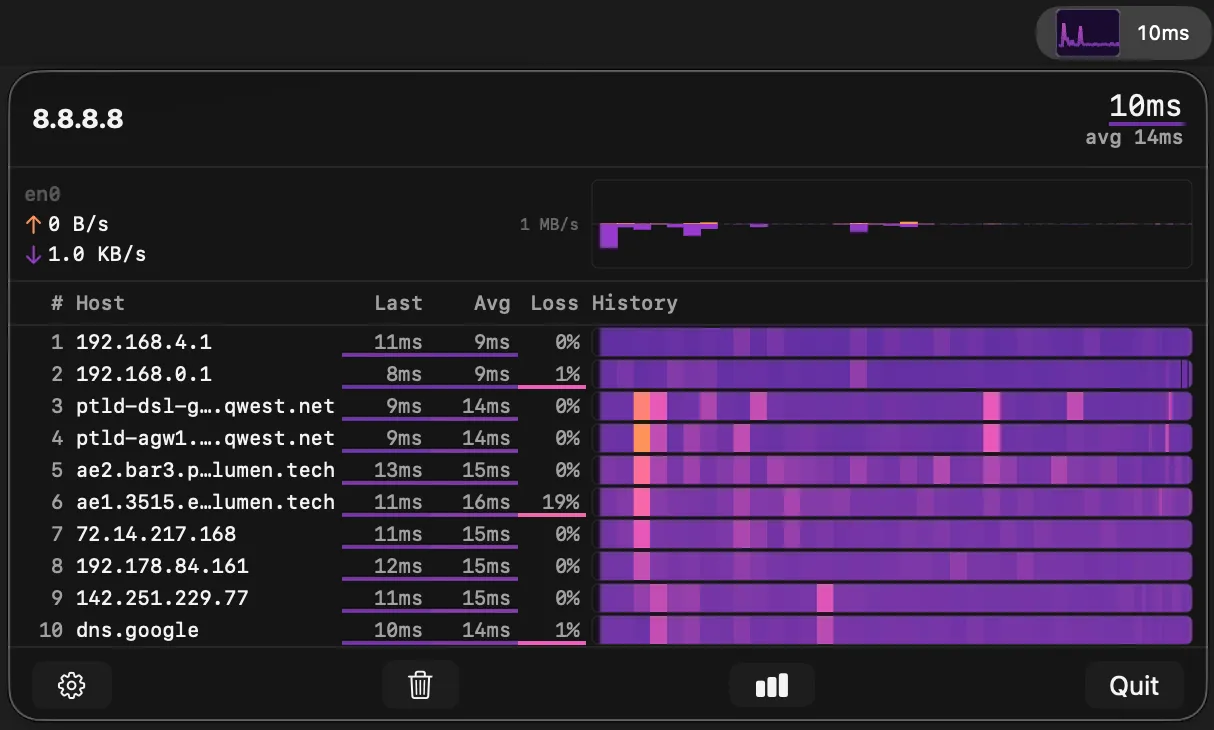
TraceBar runs continuous traceroute probes from the macOS menu bar, displaying per-hop latency, packet loss, and hostname resolution in real time. It functions like mtr — a terminal-based traceroute and ping tool — but as a persistent, graphical menu bar app accessible with one click. (Free)
The menu bar sparkline shows destination latency at a glance, allowing users to spot network degradation without opening the panel. The expanded view presents a scrolling time-normalized heatmap for each network hop, with multiple color schemes to visualize latency ranges and packet loss percentages. Each hop resolves DNS hostnames automatically, providing context on ISPs, CDN nodes, and routing infrastructure.
Probe behavior adapts based on panel visibility: when the panel is closed, TraceBar reduces probe frequency to minimize network load. Users can configure target hosts, probe intervals, history window duration, maximum hop count, and latency thresholds. The app launches at login and runs silently with no notifications or interruptions.
TraceBar collects no data, includes no analytics or tracking, and establishes no network connections beyond the traceroute probes configured by the user. All diagnostic data remains local and is discarded when the app closes. The project is open source under the MIT license, with source code and releases available on GitHub.
System requirements: macOS 14.6 Sonoma or later. Available via Mac App Store, GitHub releases, or Homebrew (brew tap tracebar-app/tracebar && brew install --cask tracebar).
Pricing: (Free, open-source)
Limitations: Requires macOS 14.6, excluding users on older releases. The app monitors routes to a single configured host at a time; simultaneous multi-target monitoring is not supported. Traceroute probes require ICMP or UDP access, which may be blocked on restrictive corporate networks.
Alternatives: WhatRoute offers a standalone macOS traceroute application with geo-visualization. The built-in mtr tool (available via Homebrew) provides equivalent terminal-based monitoring. LookingGlass services offer remote traceroutes from external vantage points for ISP-side diagnostics.
Suitable for users who need persistent, low-friction visibility into network routing and latency, particularly developers, network administrators, and remote workers diagnosing connectivity issues between their Mac and cloud services.


