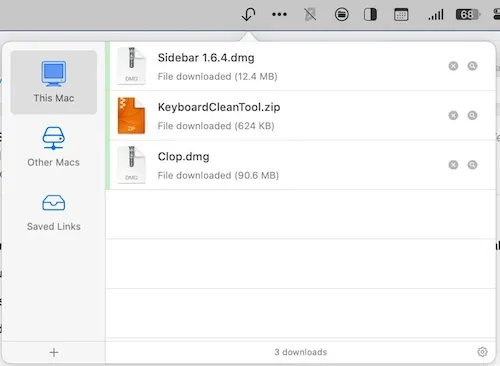
Transloader is a menu bar app that lets users initiate downloads on their Mac remotely from an iPhone, iPad, or another Mac. ($9.99, one-time)
The core workflow is straightforward: users paste a URL into the Transloader companion iOS app (or share a link directly from Safari using the share extension), select the target Mac, and the download begins on that machine without requiring any interaction at the Mac itself. Push notifications report back the download status and any Mac activity. This addresses situations where users want a file downloaded to their desktop Mac while they are away or working from another device.
Beyond simple link forwarding, Transloader supports Link Actions — user-defined rules that route specific URLs to designated apps or Automator workflows based on URL scheme or host. File Actions apply similar rule-based logic to the resulting downloads, automatically organizing files into folders or opening them in specific apps by file type, extension, or source domain. Login support allows pre-authenticating to sites that require credentials before a download can begin. Siri Shortcuts integration on iOS enables building custom multi-step download workflows.
The developer, Eternal Storms Software, maintains the app actively. Version 3.1.93 is current as of this entry. No data is collected or transmitted to third parties; all communication passes through iCloud.
System requirements: macOS 10.14 Mojave or newer. App size approximately 42 MB. An active iCloud account is required on both the Mac and iOS device.
Pricing: ($9.99, one-time) on the Mac App Store or the developer’s website. The iOS companion app is free. Also included in a Setapp subscription. A 28-day free trial is available from eternalstorms.at/transloader/.
Limitations: Requires an iCloud account; both devices must be signed into the same Apple ID for link routing to work. The Mac must be powered on and connected for downloads to start. No Android companion app exists.
Alternatives: Downie ($19.99, one-time) downloads media files directly from web URLs on the Mac but requires manual URL entry at the Mac itself. Folx (Free/Pro $9.99) is a general-purpose Mac download manager with no iOS remote-initiation feature. macOS Universal Clipboard and Handoff allow pasting content across Apple devices but do not trigger downloads automatically.
Suitable for users who frequently start Mac downloads from an iPhone or iPad, particularly in workflows where large files need to be queued on a desktop Mac while the user is away from it.


