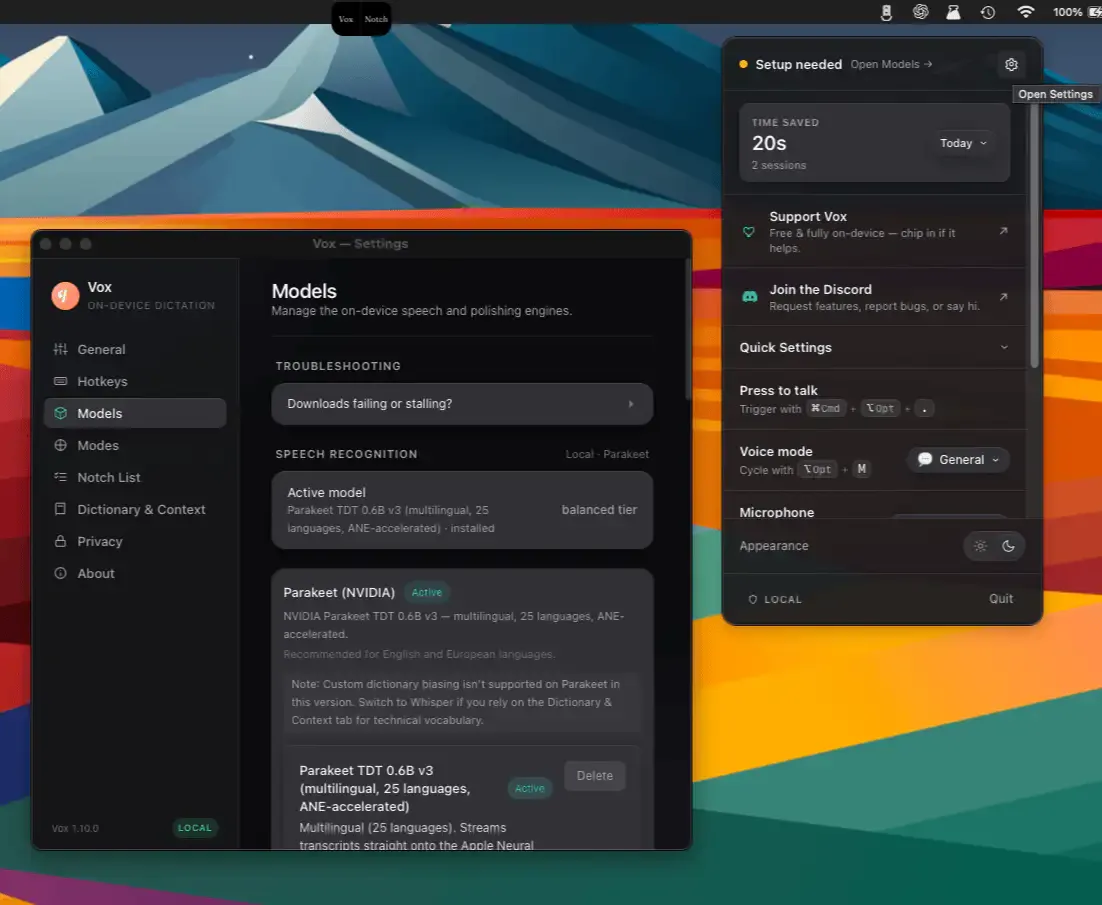
Vox is an on-device AI dictation tool for macOS that converts speech into polished text without transmitting audio to any server. The app uses Whisper or NVIDIA Parakeet for transcription and applies cleanup via Apple Intelligence or Gemma 4, producing context-appropriate output directly to the clipboard. (Free for personal use)
Activating Vox requires pressing a configurable hotkey (default ⌘⌥.), speaking, then releasing. The app processes the recording locally and places cleaned text on the clipboard for the user to paste. Because processing happens entirely on the Mac’s neural engine, results are available in under a second on Apple Silicon hardware.
Voice modes shape the cleanup stage for different output destinations: Email mode produces formal prose with proper salutations, Code Comment mode preserves technical terminology and formats for code blocks, and Chat mode generates conversational phrasing. Users can define custom modes to match specific writing styles or domain vocabularies. The VoxNotch feature provides a voice-controlled to-do list accessible from the MacBook notch area on supported hardware.
No account is required and no telemetry is collected. After the initial model download, the application operates without internet access. Network behavior is verifiable independently, which addresses privacy concerns common to cloud-based dictation services.
System requirements: Apple Silicon (M1 or newer), macOS 14 Sonoma or later. An internet connection is needed for the initial model download only.
Pricing: Free for personal use; commercial licenses from $12 USD per seat per month (fair-source).
Limitations: Apple Silicon is required; Intel Macs are not supported. Output goes to the clipboard rather than typing directly, requiring a manual paste step. The initial model download adds setup time before first use.
Alternatives: Superwhisper ($8.99/month, richer integrations), macOS built-in dictation (free, cloud-processed by default), Wispr Flow (subscription, real-time inline typing).
Suitable for users who want private, accurate voice dictation without cloud dependency, particularly those on Apple Silicon Macs handling sensitive content or operating in low-connectivity environments.


