
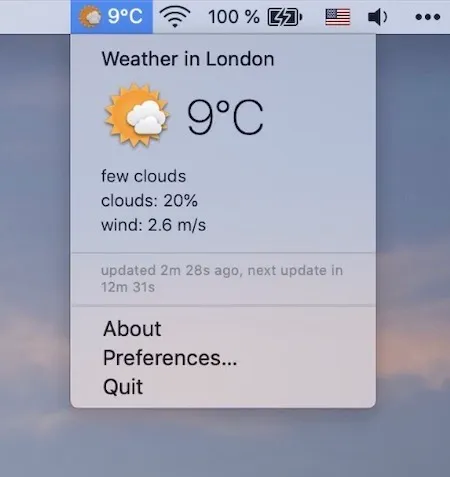
Weather for Status Bar displays current weather conditions in the Mac menu bar with automatic updates every fifteen minutes. The app takes a minimalist approach, showing temperature and conditions at a glance without elaborate widgets or promotional content.
The feature set is intentionally limited. The app shows current temperature and weather conditions in the status bar. Clicking the icon reveals a popup with more detailed information. No configuration of API keys or weather service accounts is required. The fifteen-minute update interval balances currency with reasonable service usage.
Developer Mykola Blokhin built the app with a focused approach: no ads, no subscription prompts, no rating requests. The app is completely free through the Mac App Store.
Requirements include macOS 10.14 Mojave or later. The app size is 52.4 MB.
The current version is 1.3, released November 2019. While the app has not received recent updates, it continues to function on current macOS versions including Sequoia. For simple utilities, stability matters more than constant feature additions.
Limitations include occasional data accuracy variations when compared to other weather services, which is common across weather apps using different data sources and modeling. Users needing precise forecasts or specialized meteorological data should consider more robust alternatives. The app is built for quick reference rather than detailed weather planning.
Users with crowded menu bars should consider whether the additional icon is worth the space. Menu bar management tools like Ice or Bartender can help organize the clutter if needed.
Alternatives for more feature-rich weather monitoring include Weathergraph and Forecast Bar.
Suitable for users who want simple, glanceable weather information in the menu bar without complexity, notifications, or premium features.