
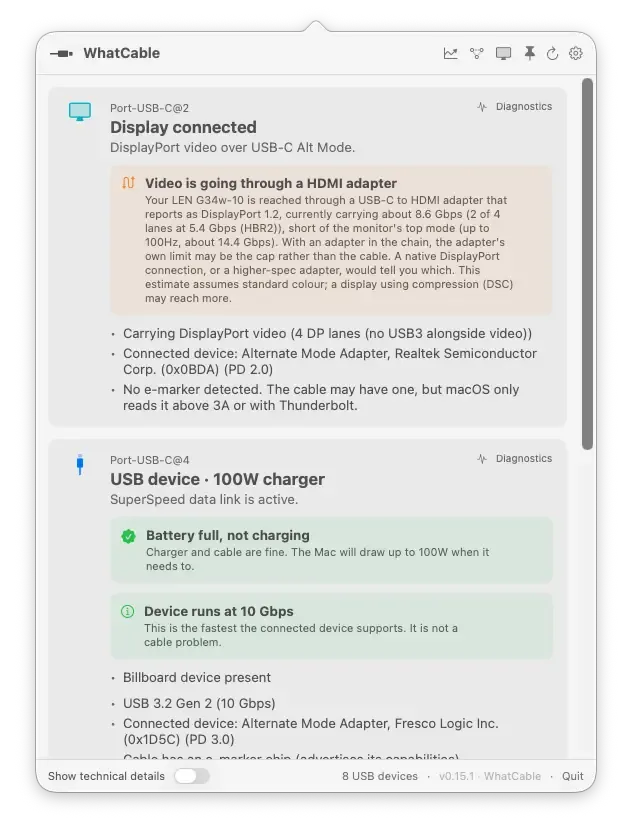
WhatCable is a free, open-source macOS menu bar utility that tells you in plain English exactly what each USB-C cable plugged into your Mac can do — and why your Mac might be charging slowly.
USB-C cables are impossible to tell apart by sight. A cable that looks identical to your 240W Thunderbolt 4 cable may actually be a USB 2.0 charging-only cable capped at 60W. macOS already reads this information from the cable’s e-marker chip via IOKit — WhatCable surfaces it as a menu bar popover you can check in seconds.
Open the menu bar icon to see at-a-glance headlines for every connected port: Thunderbolt/USB4, USB device, display connected, charging only, slow USB/charge-only cable, or nothing connected. For each port, WhatCable shows the data speed (USB 2.0 to 40 Gbps) and power delivery rating (up to 240W), then explains the bottleneck in a single sentence — “your cable limits charging speed, not the charger” — so you know exactly which component to replace.
The free version covers all core diagnostics. The optional WhatCable Pro upgrade ($9.99 one-time, up to 2 Macs) adds live power metering that updates in real time, full negotiation diagnostics with per-connection breakdowns, port health counters, pin diagrams, and liquid detection status. Desktop widgets in small, medium, and large sizes are also included.
The app is signed, notarized, and distributed outside the Mac App Store because Apple’s App Sandbox blocks the low-level IOKit reads WhatCable depends on.
System requirements: macOS 14 Sonoma or later. Apple Silicon only (M1, M2, M3, M4). Intel Macs are not supported.
Pricing: Free (core diagnostics). WhatCable Pro is $9.99 one-time, works on up to 2 Macs.
Limitations: Apple Silicon only — Intel Macs cannot use WhatCable. Not available on the Mac App Store. IOKit access could be restricted in a future macOS update.
Alternatives: System Information (built into macOS, under Apple menu > About This Mac > System Report > USB) shows raw USB device data without the plain-language summary. USB-C Power Meter hardware adapters provide real-time wattage readings without needing software, at the cost of $20–$50 per adapter.
Suitable for anyone who frequently connects USB-C hubs, chargers, or storage devices and wants to understand what their cables are actually capable of.


