
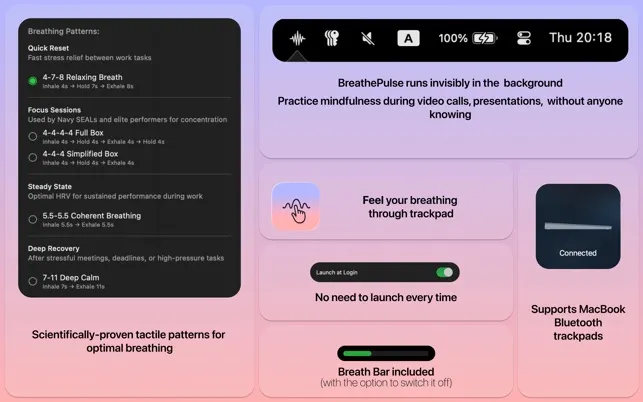
BreathePulse delivers guided breathing exercises through haptic feedback on MacBook trackpads or Magic Trackpad 2. The app sends gentle pulses to guide breathing patterns, enabling users to follow breathing exercises through tactile sensation while continuing to work.
The approach enables discrete mindfulness practice during meetings, presentations, or focused work sessions. Users activate breathing sessions from the menu bar, and the trackpad delivers rhythmic pulses corresponding to inhale, hold, and exhale phases. The feedback remains subtle enough to avoid interfering with normal trackpad navigation and clicking.
Available breathing patterns include scientifically-documented techniques: 4-7-8 breathing, Box Breathing (4-4-4-4), and several additional options. Each pattern uses distinct pulse sequences to differentiate breath phases without requiring visual attention to the screen.
The app requires Force Touch trackpad capability for optimal haptic feedback. Setup involves granting standard accessibility permissions for trackpad control. Resource usage is minimal, and the interface supports both macOS light and dark modes automatically.
Privacy-focused design means no data collection occurs; all usage remains local to the device. The 2.4 MB download size reflects the app’s focused functionality.
System requirements: macOS 12.0 or newer, Force Touch-enabled trackpad (built-in MacBook trackpad or Magic Trackpad 2), Intel or Apple Silicon Mac
Pricing: $14.99 (one-time purchase)
Limitations: Requires Force Touch trackpad hardware. The tactile guidance approach may not suit users who prefer visual or audio-guided meditation. Not a replacement for comprehensive meditation apps with broader content libraries or guided sessions.
Alternatives: Headspace ($70+/year, broader meditation content), Calm (subscription, audio-guided), Breathe (Apple Watch, visual guidance)
Suitable for users who need discrete stress management during professional situations where visual meditation apps are impractical, particularly during video calls, presentations, or high-pressure work environments.


