
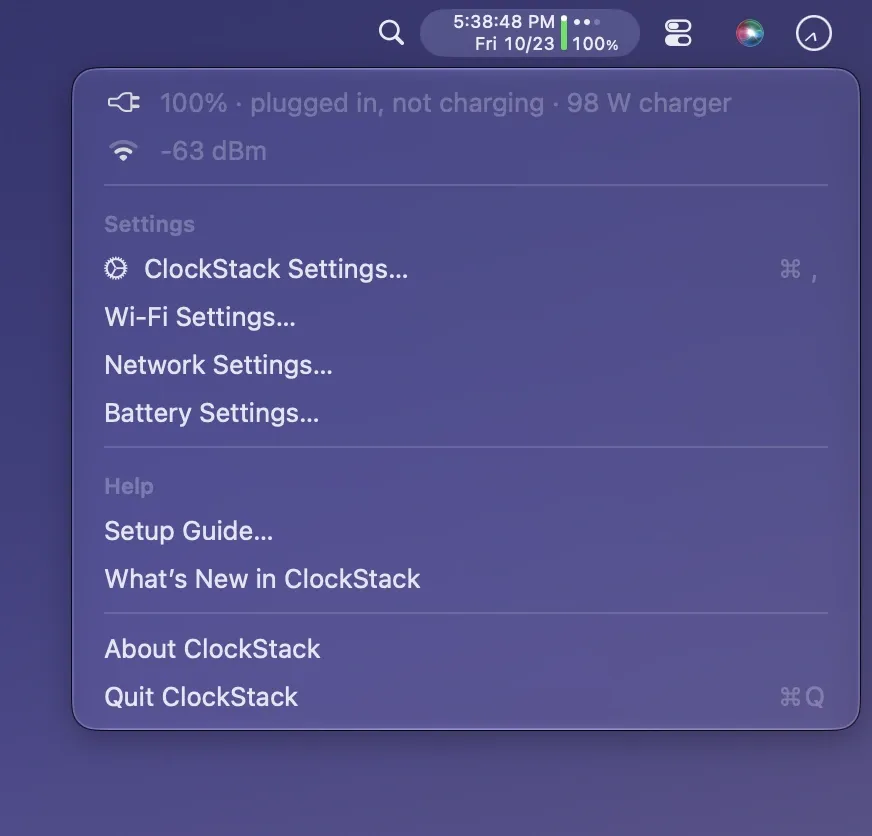
ClockStack combines time, date, battery status, and network indicators into one compact menu bar item by stacking the time above the date vertically, reducing the width needed for these four system indicators compared to their native macOS equivalents. ($2.99, one-time — launch price until 30 November 2026; regular price $4.99) It is available on the Mac App Store.
The time display supports 12-hour and 24-hour formats with optional seconds and custom patterns. Date display offers multiple formats — compact, minimal, ISO 8601, US, system default, or a user-defined pattern — and can be hidden to leave a single enlarged time line. The battery bar changes color by charge level: green at high, orange at medium, red at low, and yellow in Low Power Mode. A moving dot indicates active charging; a still dot indicates plugged in without charging, which is the common state during Optimized Battery Charging. The menu panel shows wattage, charger power rating, and time to full or empty. Network status uses Wi-Fi signal dots (one to three), with distinct indicators for no connection, Wi-Fi off, Personal Hotspot tethering, and Ethernet.
ClockStack collects no data, requires no account, and performs no analytics. The Wi-Fi signal check runs every 15 seconds; the display pauses when the screen is off. An option to show the Wi-Fi network name in the menu requires a one-time location permission from macOS, since the OS only exposes network names to apps with location access.
System requirements: macOS 13 Ventura or later. Apple Silicon and Intel Macs supported. Available on the Mac App Store. Interface available in English, German, French, Italian, and Spanish.
Pricing: ($2.99, one-time — launch price; regular price $4.99 after 30 November 2026) No subscription. Prices may vary by country.
Limitations: Requires replacing the system clock with an analog clock and hiding native battery/Wi-Fi icons in System Settings to achieve the space-saving benefit. macOS does not allow fully removing the native clock. Wi-Fi network name display requires location permission. On Macs without a battery (Mac mini, Mac Pro), the battery bar is hidden.
Alternatives: Dato ($16, one-time) adds calendar integration and world time zones in addition to clock display. Vanilla (free) and Ice (free, open-source) focus on hiding existing icons rather than consolidating them. The native macOS Control Center provides similar indicators but occupies more space.
Suitable for users on MacBooks with a notch who want to free menu bar space by consolidating the clock, battery, and Wi-Fi icons into a single, information-dense item.


