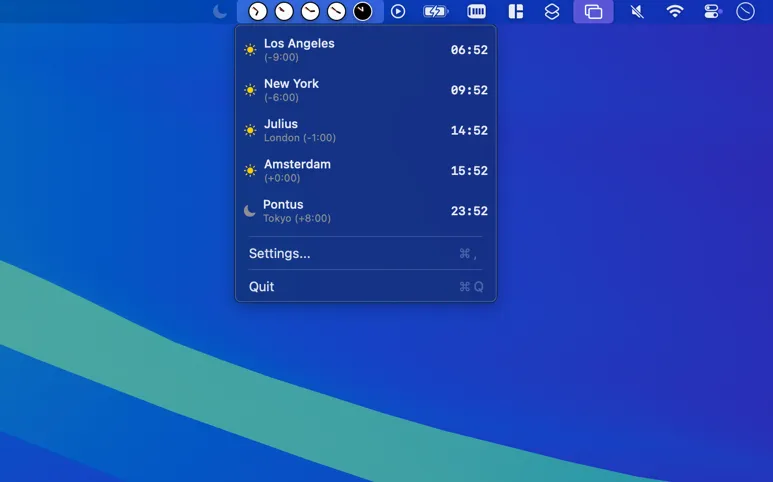
ClockZones displays up to eight time zones directly in the macOS menu bar with visual day/night indicators. The app provides at-a-glance timezone awareness without requiring clicks or dropdown menus, showing current times alongside sunrise and sunset calculations for each configured zone.
The visual design uses color coding to distinguish day and night periods, making it immediately apparent whether contacts in other time zones are in working hours. Sunrise and sunset calculations provide context beyond raw time values, helping users understand what part of the day remote colleagues are experiencing.
Configuration involves selecting time zones from a comprehensive list and arranging them in preferred order. Display customization includes time format options, information density settings, and launch-at-login configuration. All calculations happen locally—the app requires no internet connection after installation and collects no user data.
ClockZones displays zones compactly within the menu bar itself rather than behind a dropdown menu. This design prioritizes immediate visibility over hidden information, though it consumes more menu bar space than single-icon alternatives. The app runs continuously with minimal resource usage as a lightweight background process.
Developed by Inside Internet, ClockZones receives active development with version 1.2.0 as the current release. The app is available exclusively through the Mac App Store.
System requirements: macOS 14.5 (Sonoma) or later, compatible with Apple Silicon and Intel Macs.
Pricing: Available on the Mac App Store (check current pricing).
Limitations: The 8-timezone maximum may not suffice for users coordinating across larger global teams. The app does not include meeting scheduler functionality for finding optimal cross-timezone meeting times. Weather, local holidays, and similar contextual information are not provided.
Alternatives: Dato combines calendar integration with timezone features. World Clock Pro offers more extensive timezone lists and meeting planners. The built-in macOS Clock widget in Notification Center provides basic timezone display without additional software.
Suitable for users who coordinate across multiple time zones and prefer visual, always-visible timezone information over feature-rich but more complex alternatives.