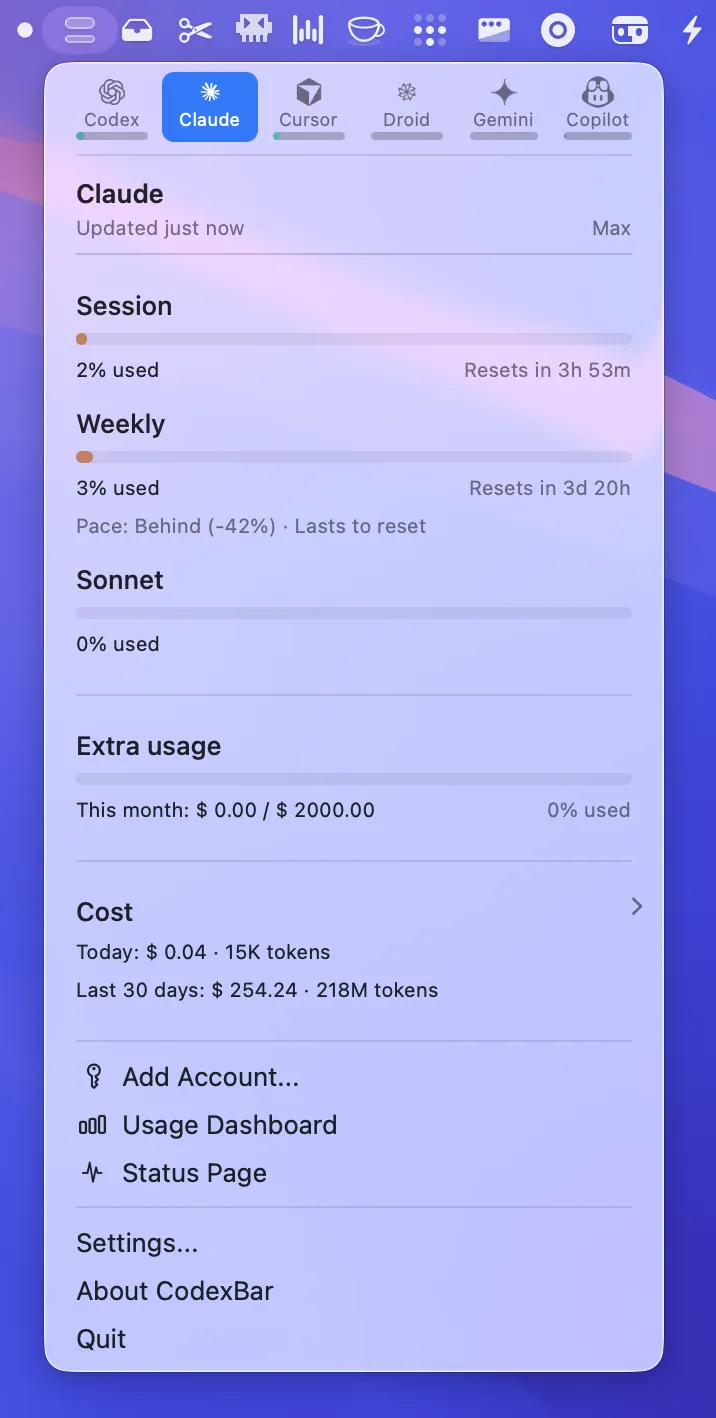
CodexBar provides real-time tracking of API usage limits and session quotas for AI coding assistants directly in the menu bar. It supports 60+ providers, including Codex, Claude Code, Cursor, Gemini, Antigravity, Droid, Copilot, z.ai, OpenCode, OpenRouter, MiniMax, Kimi, Warp, and Devin.
Usage information displays in a dual-meter format with session usage on top and weekly limits on the bottom. A countdown timer shows exactly when limits reset, enabling developers to plan work across multiple AI tools based on available quota.
The app reuses existing provider sessions rather than storing passwords. Auth methods vary by provider: OAuth, device-code flow, API keys, browser cookies, or local files. Some cookie-based providers still need an authenticated browser session.
Additional features include a bundled CLI tool for scripts and CI workflows, WidgetKit support for desktop widgets mirroring the menu bar display, and provider status incident tracking.
Built by Peter Steinberger and released as free and open-source software under the MIT license.
System requirements: macOS 14 or later. Supports both Apple Silicon and Intel Macs.
Installation: Download from GitHub releases or install via Homebrew with brew install --cask steipete/tap/codexbar.
Pricing: Free, open-source (MIT license).
Limitations: The dual-meter display requires moderate menu bar space. Cookie-based providers still need an authenticated browser session. Tracking accuracy relies on each service exposing usage data in a form CodexBar can read.
Alternatives: Manual dashboard checking for individual services. Some AI coding tools include built-in usage displays, though none aggregate across multiple platforms.
Suitable for users who work with multiple AI coding assistants and need visibility into quota consumption across services to avoid mid-session interruptions.


