
DevCacheCleaner is a free macOS utility that reclaims disk space consumed by development tool caches, accessible from the menu bar. (Free)
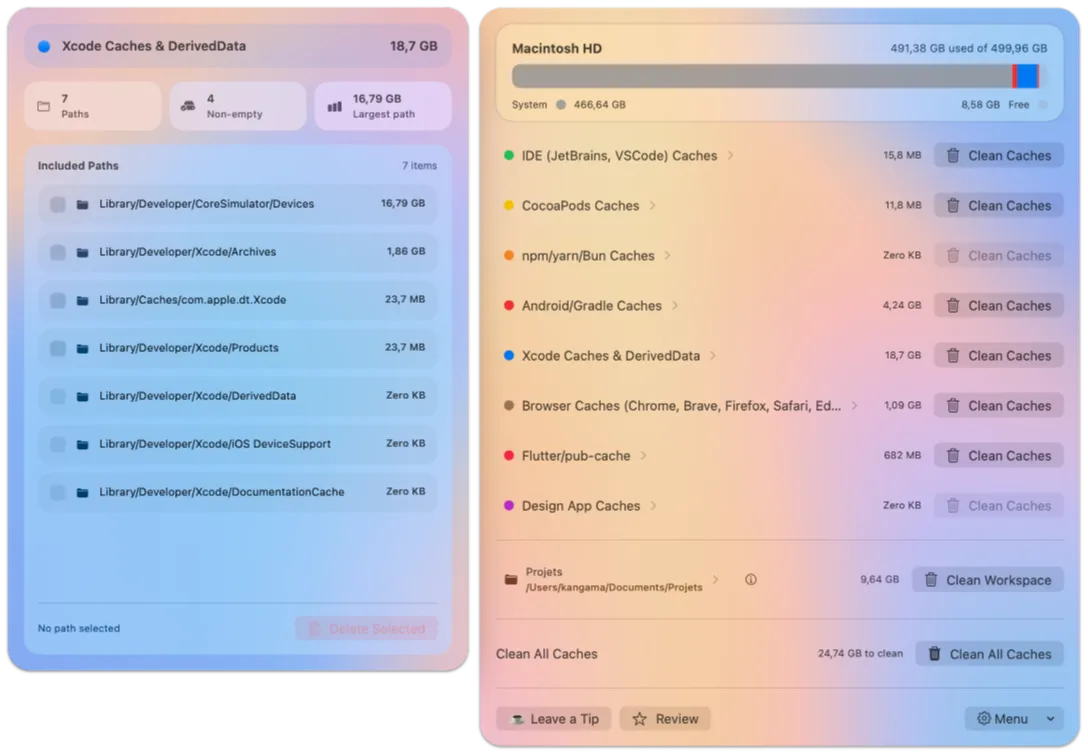
Active development environments accumulate significant cache data across Xcode build artifacts, package manager downloads, and browser developer profiles. DevCacheCleaner aggregates these cleanup tasks into a single interface organized by tool category: build systems (Xcode DerivedData, Gradle, Flutter, Android), package managers (npm, Yarn, Bun, CocoaPods), browser caches (Chrome, Brave, Firefox, Safari, Edge), design apps (Figma, Adobe, Apple Motion), and IDEs (JetBrains products, VS Code).
Before any files are removed, the app performs a workspace analysis and presents a detailed breakdown by folder and estimated size. Users select specific directories to clean rather than triggering a bulk deletion, reducing the risk of accidentally removing files from active projects. A separate workspace scan identifies inactive dependencies—node_modules folders, Pods directories, and Gradle build outputs from dormant projects—that are often overlooked during routine disk cleanup.
The menu bar icon provides quick access to the scanner and cleaner without opening a separate window manager. DevCacheCleaner is open-source and distributed through the Mac App Store.
System requirements: macOS 26 or later. Compatible with Apple Silicon and Intel Macs. Full Disk Access may be required for browser cache cleaning in sandboxed environments.
Pricing: (Free)
Limitations: Requires macOS 26, excluding users on earlier versions. Browser cache cleaning may require Full Disk Access permission, which some users or organizations restrict. The app does not schedule or automate recurring cleanups—each run is manually initiated. It does not clean app-specific caches outside the supported tool list.
Alternatives: DaisyDisk ($9.99) provides a visual disk usage map for broader cleanup. CleanMyMac X (subscription) includes developer cache cleaning alongside general system maintenance. The Xcode Organizer and manual rm -rf ~/Library/Developer/Xcode/DerivedData handle Xcode cleanup without a dedicated app.
Suitable for developers working with multiple SDKs and build pipelines who want selective, tool-aware cache cleanup without scripting manual directory deletions.


