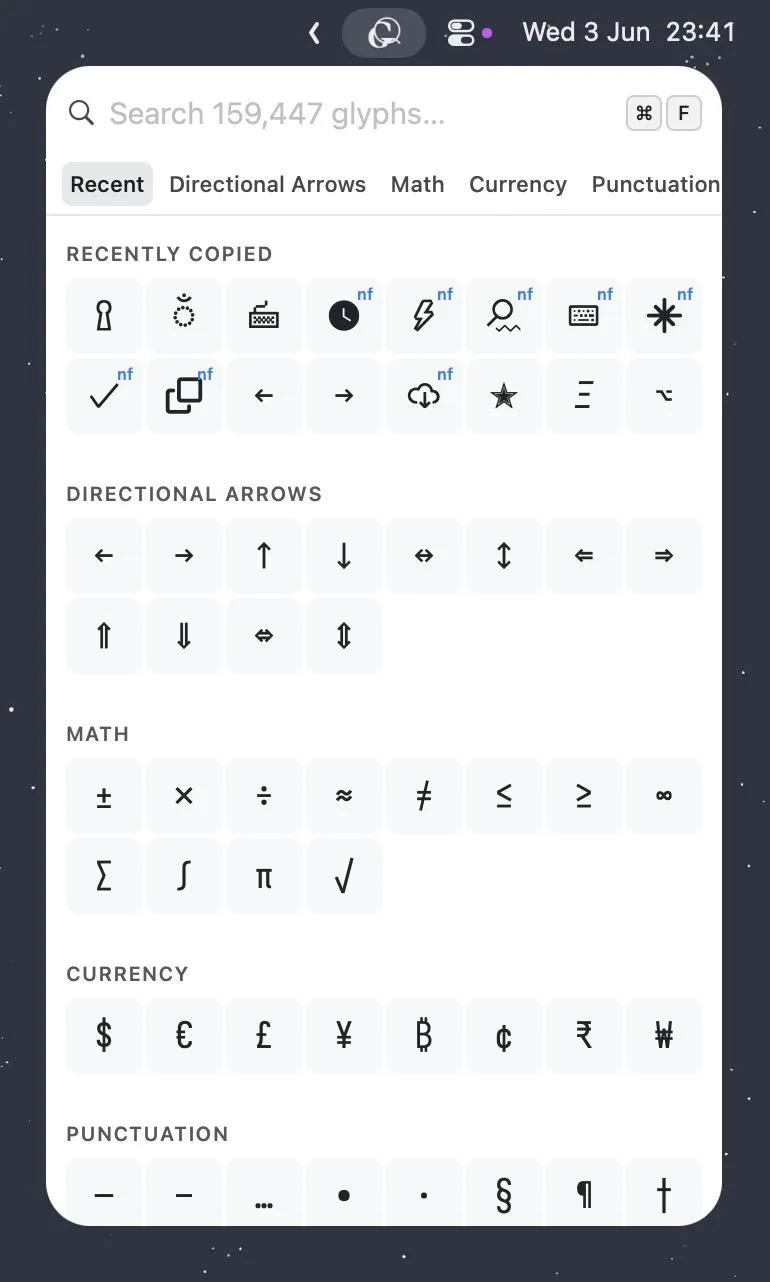
Glyf is a macOS menu bar app for searching and copying Unicode and NerdFont characters. Pressing ⌃⇧C opens a floating picker from any application, enabling immediate character lookup without leaving the current workflow. ($2.99, one-time)
The search index covers over 159,000 characters spanning the full Unicode standard and the complete NerdFont set. Fuzzy matching filters results as users type, requiring only partial names or descriptions to locate a character. Commonly used characters appear at the top of the list, reducing search time for frequently accessed glyphs. Pressing Enter copies the selected character to the clipboard; mouse interaction is optional throughout.
Built as a native Swift app, Glyf maintains a small resource footprint. The picker opens instantly with no perceptible delay. The menu bar icon provides a persistent entry point, and the hotkey works system-wide across all applications.
The NerdFont support is relevant for developers configuring terminal emulators, Neovim statuslines, or shell prompts that rely on icon fonts. The Unicode coverage extends the tool’s utility to writers, designers, and content creators needing mathematical symbols, currency signs, arrows, or specialty characters unavailable on a standard keyboard.
System requirements: macOS 13.0 Ventura or later. Native Swift app with no third-party dependencies. Download size is small.
Pricing: ($2.99, one-time) with a 7-day free trial available at glyf.molovo.co.
Limitations: No built-in way to insert characters directly into the current field—the workflow requires a paste step after copying. Character categories or browsing by Unicode block are not available; search is the only discovery method. No iOS companion app.
Alternatives: The macOS built-in Character Viewer (accessible via Edit → Emoji & Symbols) provides Unicode browsing with no cost but lacks NerdFont support and requires more clicks. PopClip with a character extension offers clipboard augmentation. Rocket provides emoji-specific insertion with colon syntax.
Suitable for users who frequently insert special characters, emoji, or icon font glyphs and prefer a keyboard-driven workflow over the macOS built-in Character Viewer.