
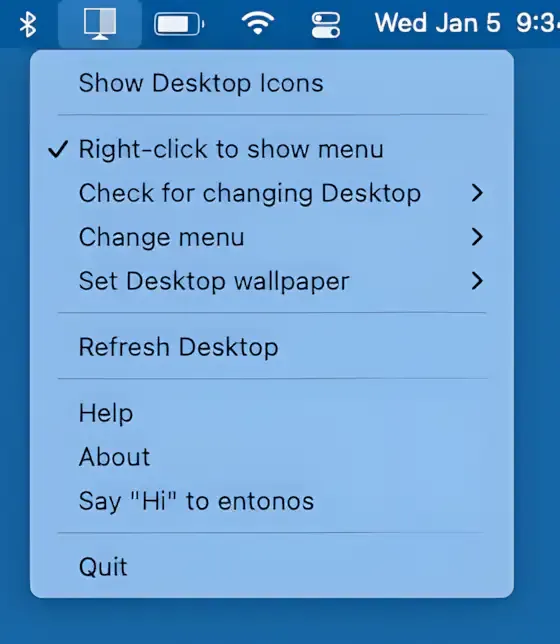
Hide Icons provides a visual solution for desktop clutter by overlaying a blank background that conceals all desktop files and folders. Unlike organizational tools that move or sort files, this app simply hides everything from view while keeping files accessible through Finder and applications.
The app operates through a customizable keyboard shortcut toggle. Users can instantly hide desktop contents before screen sharing, presentations, or recording sessions, then reveal everything when needed. Files remain in their original locations throughout, with no impact on actual file organization or accessibility.
Key features extend beyond basic icon hiding. Users can configure individual desktops with different background images or solid colors, useful for multi-desktop workflows. Menu bar customization options allow matching the appearance to different use cases. Multi-monitor support handles display additions and removals automatically, adapting the overlay as hardware configuration changes.
The app integrates with macOS Dark Mode on version 13 and newer, adjusting its interface accordingly. Resource usage remains minimal, with the app running efficiently in the background without noticeable system impact. Installation size is 11.7 MB.
System requirements
- macOS 10.13 or later
- Available via Mac App Store (Free)
Limitations
- Hides icons visually only; does not provide actual organization or cleanup
- No automation rules for conditional hiding
- Limited to desktop and menu bar; does not manage other visual elements
Alternatives
- Use Stacks (Built-in macOS) - Automatically organizes desktop items by type, but physically moves files
- Spotless ($5.99) - Automated desktop cleaning with customizable rules
- HiddenMe (Free) - Similar overlay-based hiding functionality
Hide Icons is completely free with no in-app purchases. Developer Gregory Parker has made the source code available on GitHub. Suitable for users who need quick visual desktop cleanup for presentations or recordings without committing to permanent file reorganization.