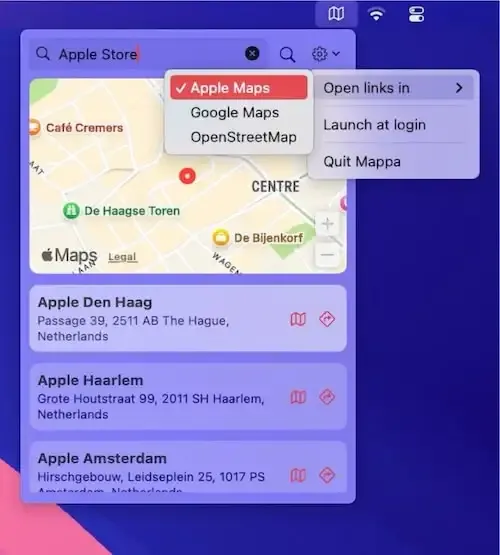
Coordinating with teammates across multiple time zones means I’m constantly looking up addresses and meeting locations throughout the day. I used to switch to my browser, open Google Maps, wait for it to load, then search for whatever address a colleague sent me. The context switching disrupted my workflow every single time.
Mappa Mini solved this problem by putting location search directly in my menu bar. Click the icon, type an address or place name, and the app displays results immediately with options to open them in any major mapping service. The first time I used it, I searched for a nearby restaurant, and within two seconds I had it open in Apple Maps with transit directions ready.
What sets Mappa Mini apart is its comprehensive mapping service support. Instead of locking you into one provider, the app lets you choose between Apple Maps, Google Maps, OpenStreetMap, Waze, and Here WeGo. This flexibility matters when different services excel at different tasks. I use Apple Maps for local navigation, Google Maps for Street View when checking unfamiliar locations before meetings, and OpenStreetMap when I need a privacy-respecting option.
The favorites functionality has become essential for my remote work setup. I’ve saved frequently-visited addresses, common meeting spots, and several hotels I use when traveling. When someone suggests meeting at one of these locations, I can pull up the address instantly without searching. You can also customize the map display size and choose between zooming to the nearest result or showing an overview of all matches.
After using Mappa Mini on my Mac Mini M4 for several weeks, the app is incredibly lightweight. At just 1.8 MB, it uses minimal system resources that I’ve never noticed any performance impact. The menu bar integration is clean, displaying a simple map icon that doesn’t consume valuable space even with a crowded menu bar.
The app provides practical features beyond basic search. You can copy coordinates for precise location sharing with international colleagues, copy individual address components when filling out forms, and share locations as URLs or images. The Street View and satellite view integration means you can quickly assess a location’s surroundings without opening a full mapping application.
Privacy-conscious users will appreciate that developer Lucas Raggers explicitly states the app collects zero data. Everything happens locally on your Mac, with searches sent directly to your chosen mapping service. No tracking, no analytics stored remotely, no account required.
System requirements are modest at macOS 14 or newer, covering any Mac running Sonoma or later. The app is completely free on the App Store with no in-app purchases, ads, or subscription requirements. This straightforward pricing model is refreshing compared to the trend toward subscription-based utilities.
The main limitation is that search functionality depends on your chosen mapping service’s data quality, which varies by region. Users in areas with limited mapping coverage might find results inconsistent. The app also requires an internet connection for searches, so it won’t help with cached or offline mapping needs.
For anyone who frequently looks up addresses, coordinates meeting locations, or works with international teams across different cities, Mappa Mini transforms a repetitive browser-based task into a single menu bar click. The multi-service support means you’re never locked into one mapping provider’s limitations or privacy policies.


