
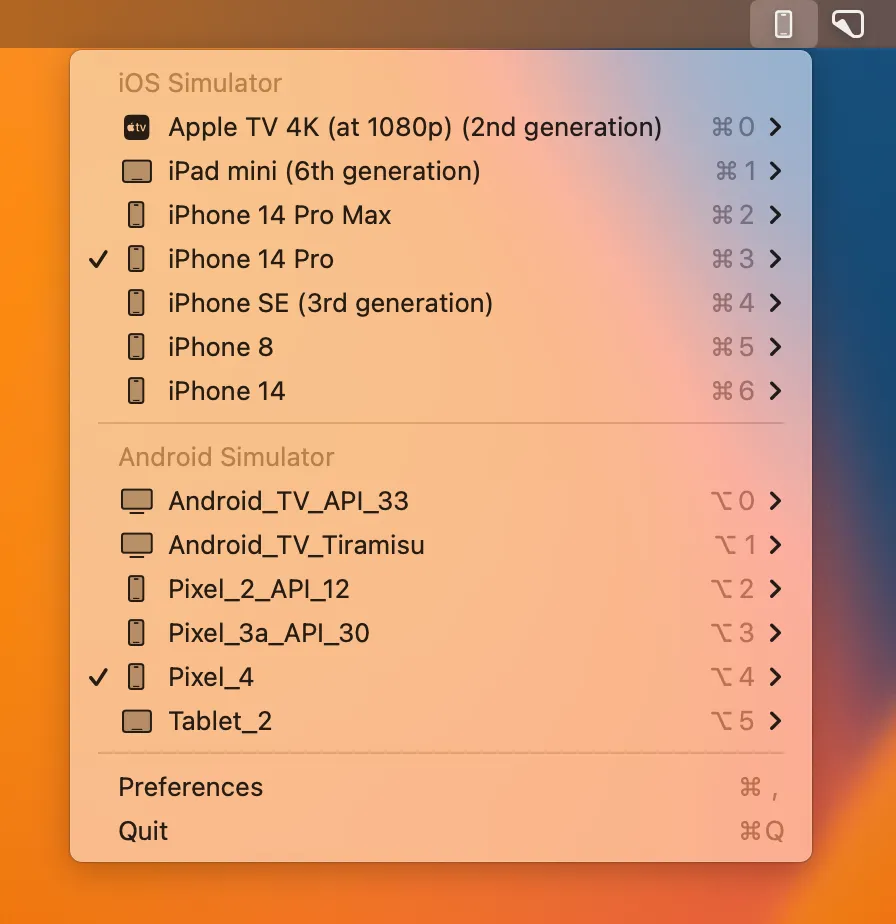
MiniSim provides one-click access to iOS simulators and Android emulators from the macOS menu bar, eliminating the need to navigate through Xcode menus or Android Studio’s AVD Manager. The app displays both iOS simulators and Android emulators in a single organized dropdown for streamlined mobile development workflows.
The native Swift implementation delivers fast performance compared to Electron-based alternatives. Emulator launches typically complete 15-20 seconds faster than navigating through native IDE interfaces. Memory usage stays around 15MB with essentially zero CPU impact when idle.
Key features include one-click device UDID and name copying for CI/CD pipeline configuration and debugging. Android emulator support includes cold boot restarts, audio-disabled operation for quiet environments, and accessibility feature toggling such as TalkBack. A global shortcut (Option+Shift+E) provides instant menu access.
Created by Oskar Kwasniewski, the project has garnered over 2,000 GitHub stars with active development. Installation options include GitHub releases, Homebrew (brew install --cask minisim), or Gumroad. The pricing model is pay-what-you-want starting at free, with a suggested $6.99 donation.
System requirements: macOS with Xcode and/or Android Studio properly configured. The app works with existing simulator setups without modification.
Limitations: The app assumes simulators are already configured in Xcode and Android Studio. Users new to mobile development must set up emulators through the respective IDEs first. MiniSim enhances existing workflows rather than replacing setup processes.
Alternatives include Xcode’s built-in simulator menu, Android Studio AVD Manager, and Control Room (iOS simulator companion).
Suitable for mobile developers working with React Native, Flutter, or native iOS/Android development who frequently switch between multiple device configurations for testing.


