Notepad Menu Edition is a plain-text scratchpad that opens from the macOS menu bar, allowing users to capture ideas and notes instantly without opening a separate application or rearranging existing windows. ($2.99, one-time)
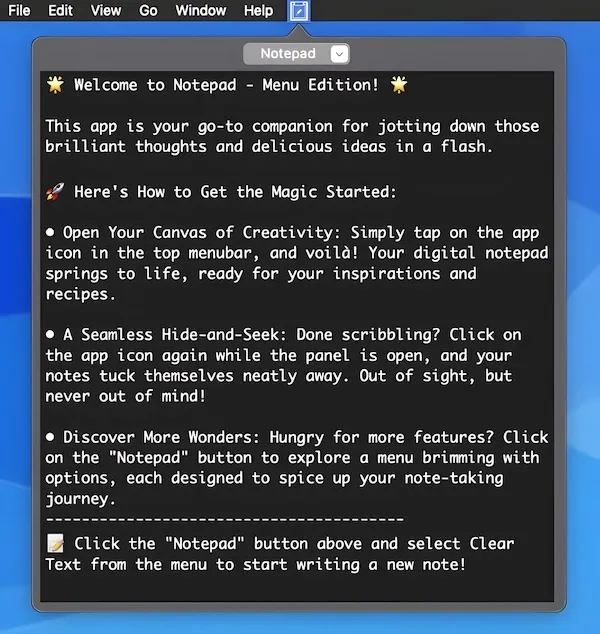
The interface is intentionally minimal: clicking the menu bar icon reveals a text panel with a fixed-width font. Users type directly into the panel and dismiss it by clicking elsewhere. Notes auto-save and reappear the next time the panel is opened, including after a system restart. The fixed-width font choice keeps formatting concerns absent from the workflow, which suits users who want distraction-free text capture rather than rich formatting.
Additional capabilities include undo support, find and replace, text file export, and copy-to-clipboard shortcuts. The panel runs in dark mode alongside the system setting. Developer Solaz Dazen srl reports no data collection by the app.
A notable limitation reported by users is that the panel closes automatically when focus shifts to another application window. This behavior makes the app less suitable for tasks that require switching between the notepad and another app simultaneously. The text panel is also non-resizable, which constrains how much content is visible at once.
System requirements: macOS 10.10 Yosemite or newer. App size is approximately 2.5 MB. Available on the Mac App Store only.
Pricing: ($2.99, one-time)
Limitations: The panel closes when clicking into any other application window, interrupting reference-while-typing workflows. The window size is fixed and cannot be resized. No iCloud sync, tagging, or folder organization; the app holds a single continuous note rather than a collection of individual notes. Version 2.0 released December 2023 with no subsequent major updates.
Alternatives: Tot by Iconfactory offers seven named text tabs in the menu bar with Markdown support ($19.99, one-time or via Setapp). Bear provides richer note management including tags and iCloud sync across devices (Free with subscription Pro at $1.49/month or $14.99/year). The macOS built-in Notes Quick Note feature (macOS Ventura and later) provides similar one-click note capture via a screen corner hotspot without an additional app.
Suitable for users who need a lightweight, always-accessible text scratchpad in the menu bar and prefer plain-text capture without file management or sync features.


