One Switch consolidates scattered macOS system controls into a single menu bar interface. Developed by Fireball Studio, the app provides instant access to approximately a dozen system toggles that would otherwise require navigation through multiple System Settings panes.
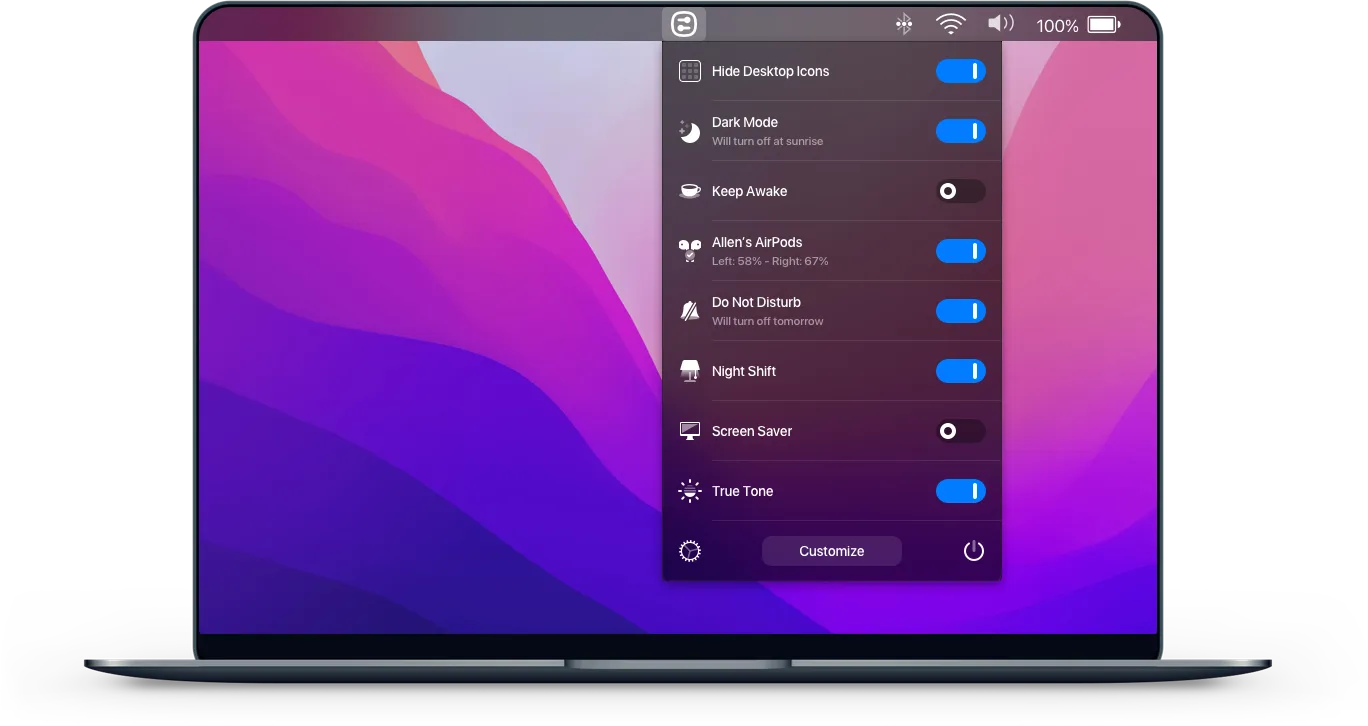
Available toggles include Dark Mode, Night Shift, Do Not Disturb, desktop icon visibility, hidden file visibility, AirPods and Bluetooth headphone connection, screen resolution switching, and system sleep prevention. Each toggle responds instantly, eliminating multi-step processes for accessing these features through native macOS interfaces.
Notable features include the Keep Awake switch preventing Mac sleep without adjusting Energy Saver settings, Hide Desktop Icons for clean screenshots or presentations, and multi-display resolution switching. The AirPods connection feature reduces Bluetooth device switching to a single click, working with AirPods, Powerbeats Pro, and other Bluetooth audio devices. The Screen Cleaning mode locks keyboard and trackpad for safe screen wiping.
The interface supports customization, allowing users to choose which switches appear and disable rarely used options. The app follows macOS design patterns with support for both light and dark modes. Resource usage is minimal with no excessive notifications or telemetry.
Requirements include macOS Big Sur (11) or higher. Pricing is $4.99 for a single license with lifetime updates, available direct from the developer, through Setapp subscription, or Chinese retailers (Lizhi Store, sspai). A 7-day free trial requires no prepayment.
Limitations relate to macOS API boundaries. Some advanced system features remain inaccessible without elevated permissions or lack documented interfaces. The menu bar icon adds to existing icons, though it consolidates multiple single-purpose utilities.
Support channels include in-app feedback, Twitter (@fireball_studio), and Reddit (r/oneswitch).
Alternatives include OnlySwitch (free, open-source) and native macOS Control Center for basic toggles.
Suitable for users who frequently toggle system settings, connect Bluetooth devices, or switch display modes and want centralized access.


