
Prompty
Organize and reuse AI prompts from the menu bar with instant search, templates, dynamic variables, and personal API key support.
- Price
- Free · in-app purchases
- Requires
- macOS 14.6 or later
- Runs on
- Apple Silicon / Intel
- Size
- 19 MB
- Around Since
- 2026
- Open Source
- No
- Last Checked
- 2026-10-31
Free on the Mac App Store, with in-app purchases.
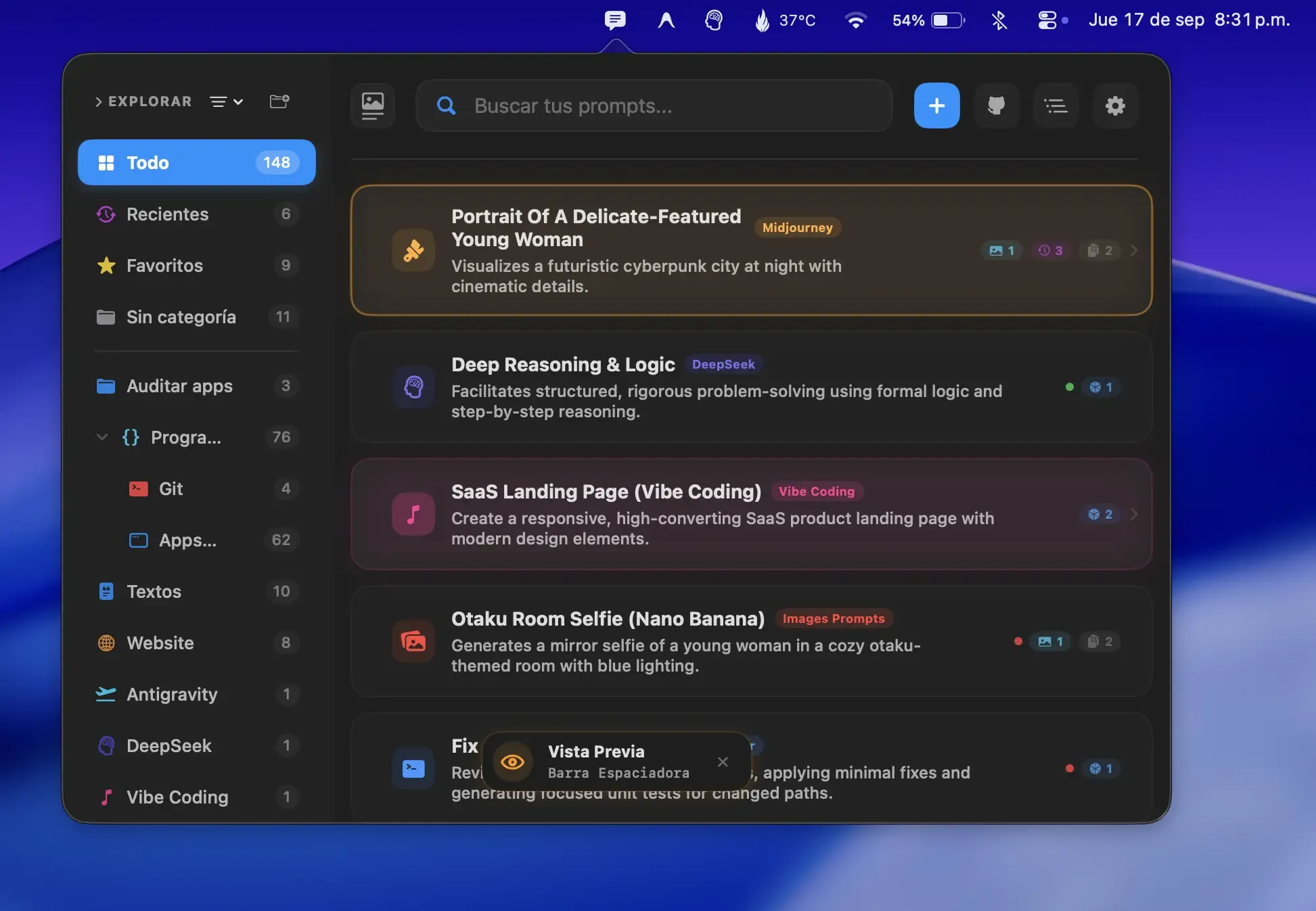
 1 screenshot
At a Glance
Best For
Saving AI prompts and pasting them with trigger-based text expansion.
The Catch
Prompty Pro is a $19.99 in-app purchase, and AI prompt refinement needs Ollama, Apple Intelligence or your own API key.
About Prompty
Prompty is a Mac menu bar utility for organizing and reusing AI prompts, providing a searchable library accessible via a global shortcut across any application. (Free, Pro $19.99 one-time)
The app supports custom organization by project, task, or AI model. A spacebar preview shows prompt content and attached images without opening the full interface. Template variables ({{variable}}) allow prompts to accept dynamic input at expansion time, enabling parameterized workflows without duplicating base prompts. Quick snippet support provides single-keystroke text insertion for frequently repeated phrases.
Prompty integrates with personal API keys for OpenAI, Claude, Gemini, and Ollama, allowing prompt testing within the app before pasting into external tools. All prompt data is stored locally by default with optional iCloud sync for multi-Mac setups. An interactive visual gallery grid provides overview navigation for large prompt libraries.
System requirements: macOS 14.6 or later; optimized for Apple Silicon, also supports Intel.
Pricing: (Free with optional Pro upgrade at $19.99, one-time; 7-day free trial included.)
Limitations: Requires macOS 14.6 or higher, excluding older systems. The full Pro feature set requires an in-app purchase. API key integration is limited to OpenAI, Claude, Gemini, and Ollama; other providers are not supported.
Alternatives: Raycast with AI features provides prompt history and snippet management; PopClip with prompt extensions offers quick-access text expansion; Alfred with snippets supports text expansion and clipboard workflows.
Suitable for users who work across multiple AI tools and want a centralized, searchable library of reusable prompts with template support.
FAQ
What does Prompty do?+
Prompty is a Mac menu bar app for saving, organizing, and expanding AI prompts. It provides a searchable library of reusable prompts accessible via a global shortcut, with support for templates, variables, and snippets.
Is Prompty free?+
Prompty is free to download. A Pro upgrade is available as an in-app purchase for $19.99 (one-time). A 7-day free trial of the full feature set is included.
How do I install Prompty on macOS?+
Download Prompty from the Mac App Store at https://apps.apple.com/us/app/prompty-save-preview-prompts/id6783754437. Requires macOS 14.6 or later.
Does Prompty run on Apple Silicon?+
Yes. Prompty is optimized for Apple Silicon and also runs on Intel Macs running macOS 14.6 or later.
Where does Prompty store prompt data?+
Prompts are stored locally on the Mac by default. Optional iCloud sync is available to keep prompts consistent across multiple Macs signed into the same Apple account.