
I’ve been looking for a straightforward way to track time on different tasks without getting bogged down in complex time tracking systems. Like many people working on multiple projects, I need something that sits in my menu bar and just works without demanding too much attention or setup.
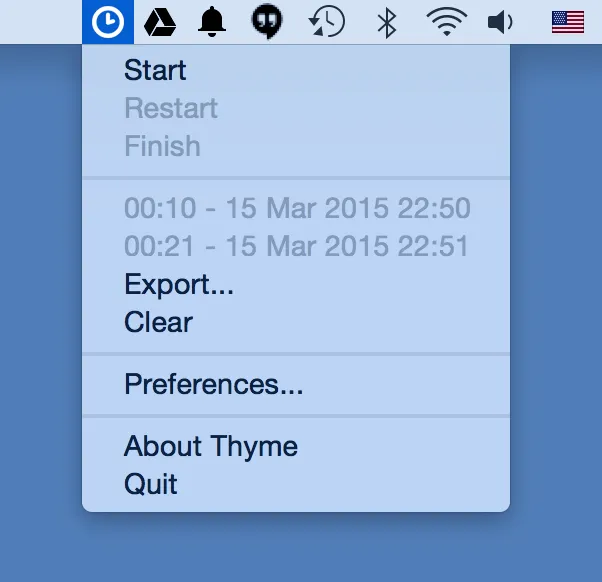
Thyme is a minimalist timer designed specifically for macOS that does exactly this. Created by developer João Moreno, it focuses on the essentials: starting a timer, stopping it, and keeping a record of how long you spent on each task. The app lives in your menu bar, displaying the current timer and giving you quick access to basic controls.
The interface is refreshingly simple. When you start a timer, Thyme asks you to tag the session with a task name, then counts up as you work. You can pause, stop, or check your current time without opening a separate window or navigating through menus. For anyone who just needs to answer the question “how long did I spend on this?” without elaborate reporting features, this approach works well.
One practical feature I appreciate is the sleep detection. Thyme automatically pauses during system sleep, screensaver, or screen lock, which prevents inflated time records when you step away from your Mac. This was added in version 0.5 and addresses a common frustration with simple timers that keep running when you’re not actually working.
For users who want to integrate time tracking into their workflow automation, Thyme supports AppleScript with four commands: start, stop, pause, and toggle. You can trigger the timer from other applications or scripts, which opens up possibilities for automated time tracking based on specific events or contexts.
The app stores all your session data locally and allows you to export it in JSON format. This gives you control over your time tracking data and the ability to analyze it with other tools if needed. Since Thyme is released under the MIT license and available as free open-source software on GitHub, you can examine the code or modify it to suit your specific requirements.
I should mention that Thyme hasn’t been updated since 2015 (version 0.5.1). While it still runs on modern macOS versions, this means you won’t see new features or updates to match current design trends. The app works reliably for basic time tracking, but users looking for active development, cloud sync, or modern productivity features might want to explore more recently maintained alternatives.
The minimalist design philosophy cuts both ways. Thyme excels at simple task timing but doesn’t offer project hierarchies, detailed reports, invoicing integration, or team collaboration features found in more comprehensive time tracking tools. For freelancers who need billing reports or teams requiring shared timesheets, this simplicity becomes a limitation rather than an advantage.
Thyme serves a specific audience well: Mac users who want lightweight, local time tracking without ongoing costs or account requirements. The open-source nature means no subscription fees, no data being sent to external servers, and complete transparency about what the app does with your information.


