
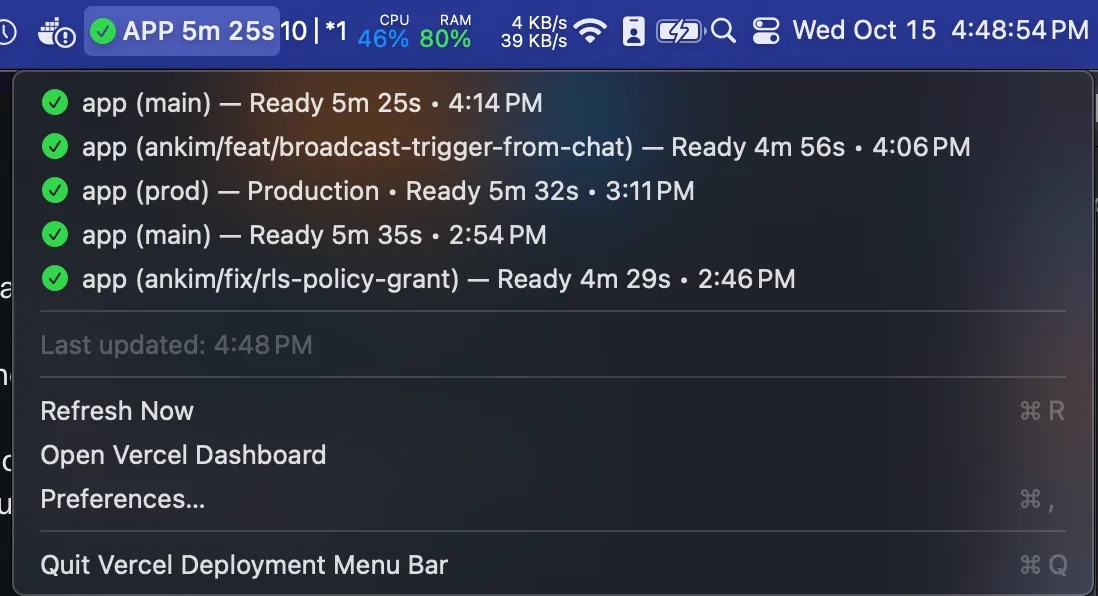
Vercel Deployment Menu Bar is a lightweight native Swift app that polls the Vercel API and displays real-time deployment status directly in the macOS menu bar.
The menu bar icon updates based on deployment state (build, ready, or error), providing at-a-glance status without requiring a browser tab. Clicking the icon displays a dropdown with deployment details and quick access to full deployment information. The upside-down triangle icon (a flipped Vercel logo) provides recognizable branding without being intrusive.
Setup requires a Vercel API token generated from account settings. For team account monitoring, a Team ID (found in the Vercel dashboard URL) is also needed. The app handles both personal and team-scoped tokens.
Resource usage is minimal at approximately 100MB memory with negligible CPU impact. The developer has properly code-signed and notarized the app, so Gatekeeper warnings do not appear when downloading the pre-built binary from GitHub releases. Building from source is also possible for users comfortable with Xcode and Swift.
The app requires macOS 13.0 or later. It is free and open-source under the MIT license.
Limitations include the single-project focus; users monitoring multiple Vercel projects may need to run multiple instances or use the Vercel dashboard. The app provides status monitoring only and does not support deployment triggers or rollbacks.
Alternatives include the Vercel dashboard (web-based, full features), Vercel CLI (terminal-based monitoring), and custom webhook integrations for Slack or Discord notifications.
Suitable for users who frequently ship changes to Vercel or run CI/CD workflows where immediate notification of deployment completion or failure is valuable.


