Wattagio is a battery health monitoring utility for MacBook that sits in the menu bar and provides detailed statistics on battery capacity, energy consumption, and per-application power usage. (Free with paid upgrade options)
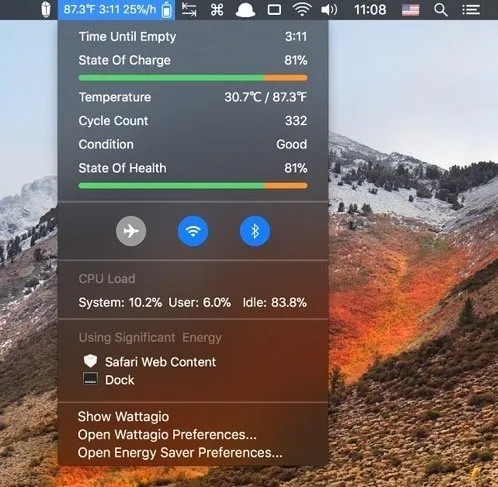
The app surfaces energy data that macOS’s built-in battery indicator omits. Users can view discharge rate, voltage, temperature, and remaining capacity at a glance, with the option to customize which metrics appear in the menu bar icon itself. Historical charts cover battery autonomy, charge time, power usage, and health trends across daily, weekly, monthly, and yearly views, enabling users to track degradation over time.
A notable capability is per-application energy tracking. Wattagio identifies which apps draw the most power, filtered by the past 24 hours, 2 hours, or since the last charge. An Assistant mode consolidates the top energy consumers and can automatically quit unused high-drain applications to extend runtime. The notifications system supports configurable alerts for high temperature, low battery capacity, charge percentage thresholds, and estimated time-to-discharge warnings.
System requirements: macOS 10.12 Sierra or newer. Compatible with Intel and Apple Silicon Macs.
Pricing: Free download available; paid upgrade unlocks advanced features.
Limitations: The historical data depends on the app running continuously; gaps occur if Wattagio is not active during a session. Per-app energy data relies on macOS APIs and may not reflect background activity that the system attributes to system processes. The app provides no remote monitoring or iOS companion.
Alternatives: Battery Buddy (simpler menu bar indicator, free), iStatistica (broader system stats including battery, paid), coconutBattery (deeper battery health diagnostics, free tier available).
Suitable for users who want more than the standard macOS battery percentage — particularly those troubleshooting unexpected battery drain or monitoring long-term battery health degradation on an aging MacBook.


