
AirStats
A lightweight, privacy-focused macOS system monitor with 16 customizable menu bar metrics including CPU, memory, GPU, network, disk, battery, and temperature.
- Price
- Free
- Requires
- macOS 14 or later
- Runs on
- Apple Silicon
- Size
- 3.0 MB
- Around Since
- 2026
- Open Source
- Yes
- Last Checked
- 2026-10-31
(Free, open-source — MIT License)
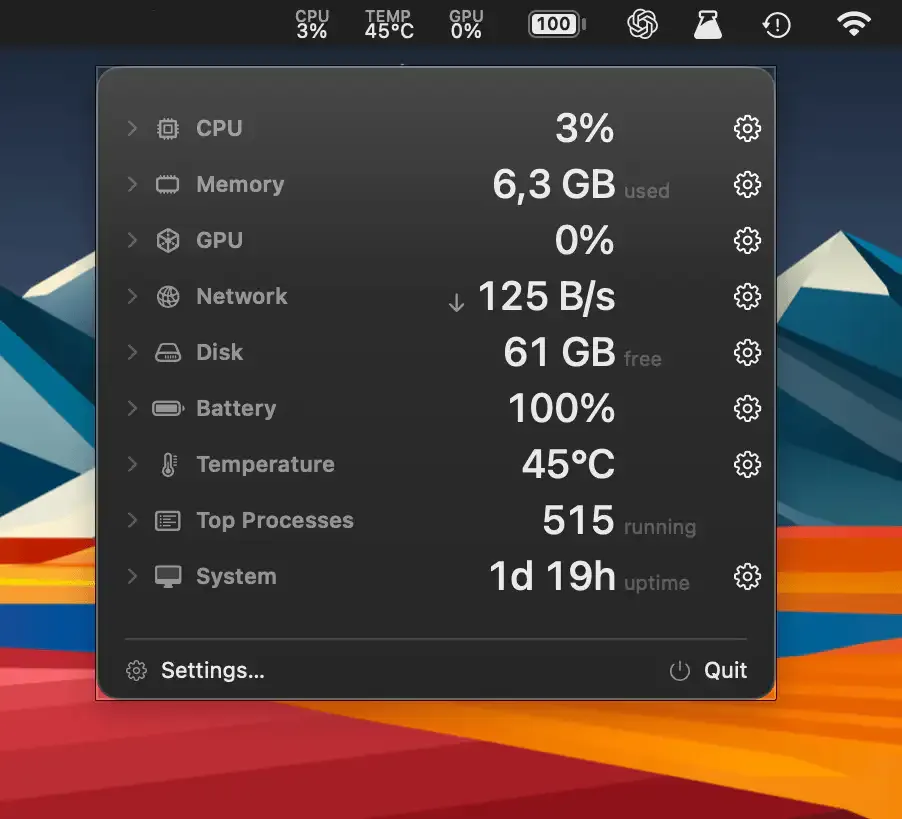
 1 screenshot
At a Glance
Best For
Watching CPU, memory, GPU, network and temperature stats from the menu bar.
The Catch
It runs only on Apple Silicon Macs; Intel Macs are not supported.
About AirStats
AirStats is a free, lightweight system monitor for macOS that surfaces up to 16 customizable metrics in the menu bar and supports an optional desktop widget for persistent display. (Free, open-source)
The app monitors per-core CPU load, memory pressure, GPU usage, network upload and download throughput, disk read/write activity, battery percentage and health, and multiple temperature sensors. Each metric can be individually enabled or disabled, allowing users to build a compact status bar display tailored to their monitoring needs. Customizable color schemes and keyboard shortcuts provide additional control over the interface.
Threshold-based notifications alert users when metrics exceed defined limits — for example, when memory pressure is high or when network throughput drops below an expected baseline. The optional desktop widget provides a persistent overlay for users who prefer always-visible system data without clicking the menu bar.
The app’s resource impact is minimal at 0.046% idle CPU usage and a 3.0 MB download. It runs as a single process with no launch agents or background helpers, and its MIT-licensed source code allows independent inspection.
System requirements: macOS 14 or later. Apple Silicon Mac required (Intel not currently supported). 3.0 MB download.
Pricing: (Free, open-source — MIT License)
Limitations: Intel Mac support is not available in the current release. The app does not include historical graphing or data logging; metrics are displayed as current values only. No direct App Store distribution — download is from the official website.
Alternatives: iStatistica Pro is a comprehensive paid alternative with historical graphs and more display options ($19.99). Stats is a free open-source alternative with Intel support and a broader Mac compatibility range. MacMonitor is a simpler free alternative covering only four core metrics.
Suitable for users on Apple Silicon Macs who want a highly customizable, privacy-respecting system monitor with no ongoing cost.
FAQ
What does AirStats do?+
AirStats displays up to 16 system metrics — including per-core CPU load, memory pressure, GPU usage, network throughput, disk activity, battery status, and temperatures — directly in the macOS menu bar. It also provides a desktop widget for persistent monitoring.
Is AirStats free?+
Yes. AirStats is free with no trial, subscription, or paid tier. The source code is MIT-licensed and available on the app's website.
How do I install AirStats on macOS?+
Download AirStats from https://airstats.app/download. The app requires macOS 14 or later and an Apple Silicon Mac. It is a 3.0 MB download.
Does AirStats run on Apple Silicon?+
AirStats runs on Apple Silicon (M1, M2, M3, M4) only. Intel Macs are not currently supported.
Does AirStats track or send any personal data?+
AirStats sends no data externally by default. The only optional network call is a public IP lookup for displaying your external IP address; this can be disabled. The app runs as a single process with no background helpers or launch agents.