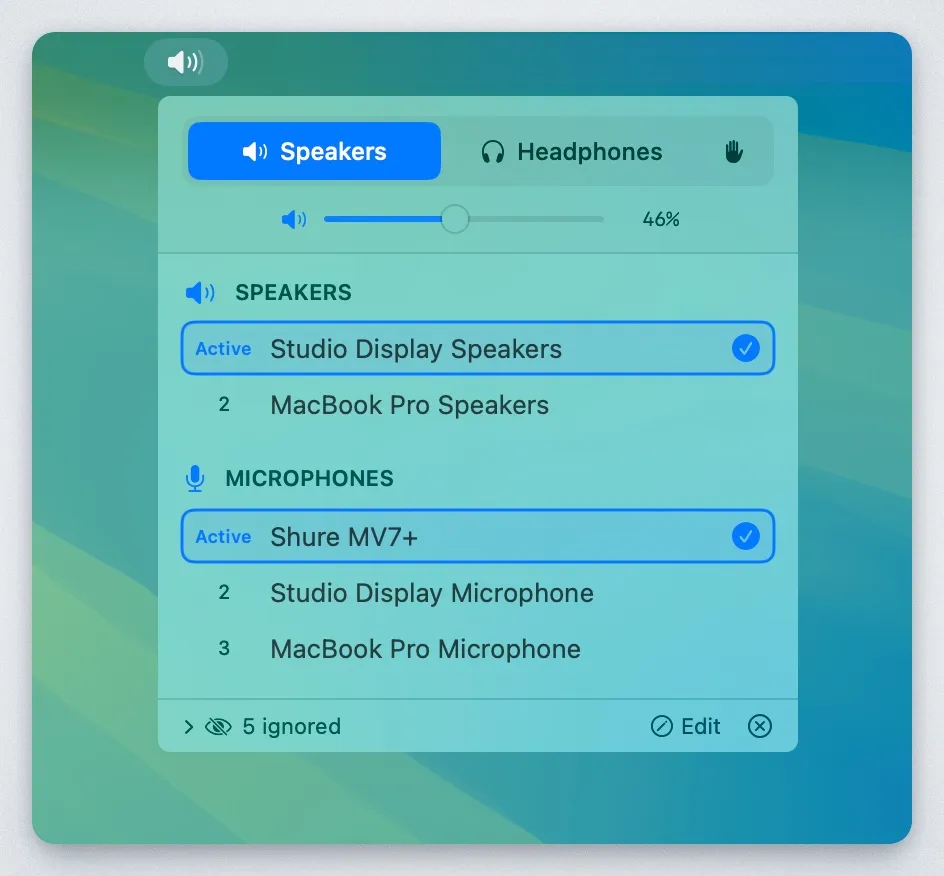
AudioPriorityBar automates audio device switching on macOS based on user-defined priority rankings. When a higher-priority device connects, the app automatically switches to it, eliminating manual navigation through System Settings.
The app maintains separate priority lists for output devices (speakers/headphones) and input devices (microphones), allowing different preferences for playback and recording scenarios. Users drag devices to reorder priorities, and the app tracks when devices were last connected. Preferences persist across sessions using device UIDs rather than names, ensuring reliable recognition when devices reconnect.
A manual override mode temporarily disables auto-switching for situations requiring a lower-priority device. Clicking the hand icon in the menu bar pauses automatic behavior until re-enabled, useful for audio testing or troubleshooting.
Built with Swift 5.9 and SwiftUI, the app uses CoreAudio to monitor device changes via event listening rather than polling, resulting in minimal CPU usage. The interface focuses on core functionality without extraneous features.
System requirements: macOS 13.0 Ventura or later.
Pricing: Free, open-source (MIT license). Available as pre-built binaries from GitHub releases or buildable from source.
Limitations: The app handles device priority switching only and does not provide volume control, audio routing between applications, or per-app device assignment. Configuration requires manual device ranking rather than rule-based automation.
Alternatives: SoundSource offers comprehensive audio routing with per-app device assignment and volume control ($39). Audio Hijack provides advanced audio capture and routing capabilities ($76). The built-in macOS Sound settings provide basic manual device switching without automation.
Suitable for users who regularly switch between multiple audio devices and prefer automatic priority-based switching over manual selection, particularly those using different headphones, speakers, or microphones for various tasks throughout the workday.


