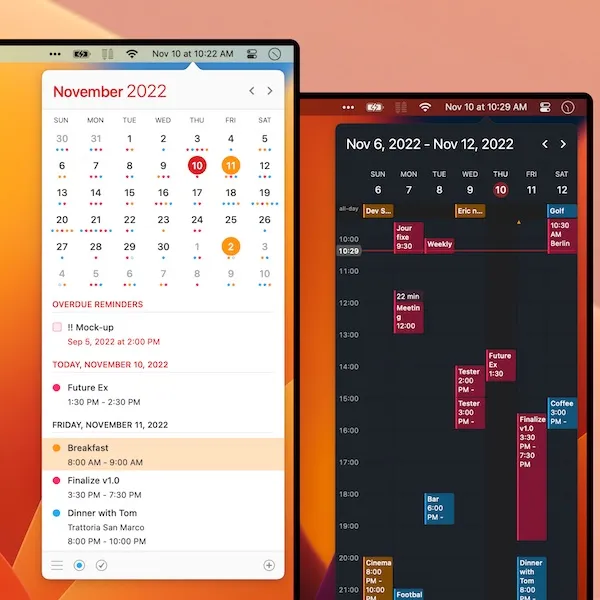
Calendar 366 II is a full-featured menu bar calendar that replaces the standard system clock with a customizable date display. Clicking reveals a complete calendar interface with natural language event creation, multi-calendar support, and extensive view options.
The natural language input system allows typing phrases like “lunch with Sarah tomorrow at 1pm” to create events without traditional forms. The app supports eight calendar views (month, week, agenda, and others) and nine visual themes for interface customization.
Multi-calendar integration covers iCloud, Google Calendar, Exchange, Outlook, and CalDAV services. Calendar sets enable organizing different calendar groups—work, personal, team schedules—for simultaneous viewing. This organizational structure eliminates constant switching between calendar sources.
Ten widgets integrate with macOS notification center and desktop, providing quick event access and task creation. Widgets respect calendar set configurations, allowing separate widgets for different calendar groups. Additional integrations include Spotlight search via “C366” keyword, Touch Bar support on compatible MacBooks, and Alfred/LaunchBar workflows for launcher-based calendar actions.
The attendee management system supports sending invitations and attaching files, with iCloud synchronization ensuring cross-platform compatibility. Complex repeating rules handle events with specific day patterns and exceptions.
Pricing: 30-day trial available; purchase through n.spektor Store or Mac App Store (price varies by region).
System requirements: macOS 10.14.6 Mojave or newer. Runs natively on Apple Silicon. Approximately 80MB memory, 1% CPU during normal operation.
Limitations: The extensive feature set requires configuration time. Natural language parsing occasionally misinterprets complex phrases. The customizable menu bar display may require reorganization of crowded menu bars.
Alternatives: Calendr (free, open-source, simpler), Fantastical (premium, similar feature depth), Itsycal (free, minimalist).
Suitable for users who manage complex scheduling across multiple calendar sources and time zones, particularly remote workers and international teams requiring comprehensive calendar management from the menu bar.


