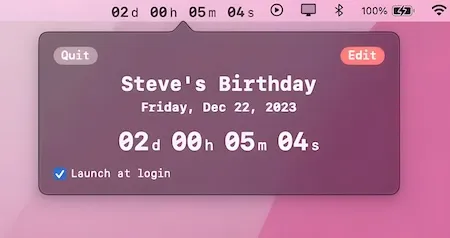
Downcount provides a straightforward countdown timer that displays directly in the Mac menu bar. The app addresses a common need for users coordinating across time zones or tracking deadlines: visible countdown information without mental calculation or constant clock checking.
The core functionality centers on creating countdown timers with real-time display in the menu bar. Users can set specific target times for events and monitor the countdown as it progresses. Three different time layout options allow customization based on preference and available menu bar space.
The app handles both short-term countdowns (meeting breaks, focused work sessions) and longer durations spanning several days. Notification support alerts users when timers reach zero, ensuring important deadlines are not missed even when attention is elsewhere. Launch at login functionality keeps countdowns running automatically when the Mac starts.
System requirements: macOS 12.0 Monterey or newer. The app weighs 5.5 MB and uses minimal system resources.
Pricing: Free to download with core functionality available. Pro version ($4.99, one-time) unlocks additional features and removes limitations. The free version reverts certain settings to defaults after an initial trial period.
Limitations: The transition from free to paid tier is not entirely clear upfront. Some users report settings reverting to defaults after the trial. Multiple simultaneous countdowns are not supported. Customization options are limited compared to more feature-rich timer apps.
Alternatives: Due Timer provides multiple timer support with menu bar integration. Be Focused offers Pomodoro-style timer functionality. The built-in macOS Clock app includes basic timer features at no cost.
The developer (Yash Poojary) actively maintains the app, with recent updates addressing countdown update bugs.
Suitable for users who need simple, visible countdown tracking for meetings, deadlines, or time zone coordination without complex configuration or feature overhead.


