I’ve been spending 8-10 hours a day staring at my M2 MacBook Air screen, and like many remote workers, I rarely think about eye strain until my eyes are already dry and burning. I recently discovered Loook, a menubar app that’s become my digital health buddy, gently reminding me to take care of my eyes throughout the workday.
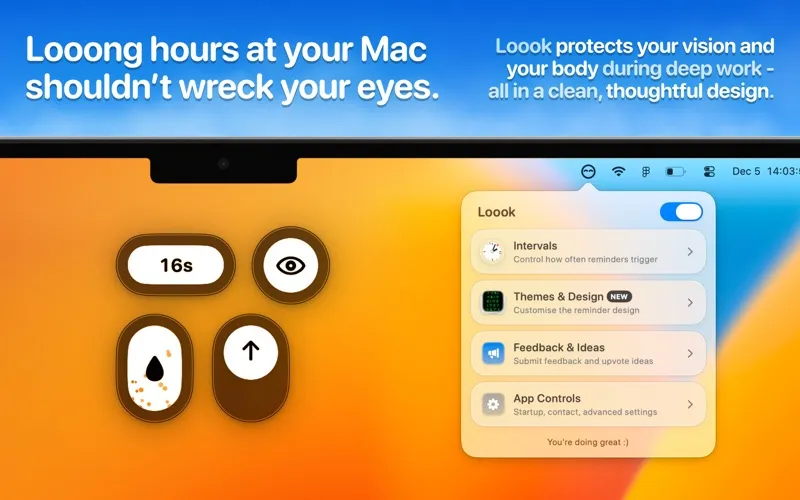
The app sits quietly in your menubar and sends periodic reminders to blink, adjust your posture, look away from the screen, and stay hydrated. What I appreciate most is how non-intrusive it is - the reminders are gentle nudges rather than aggressive interruptions. You can customize the reminder intervals to match your workflow, and there’s a pause feature that’s perfect for presentations or video calls when you don’t want notifications popping up.
I’ve been testing this on macOS 15.4, and the app is lightweight, occupying just 13.2 MB of disk space. The base app is free, which includes the core reminder functionality. Developer David Banziger recently released version 2.0 with a complete redesign that addressed some CPU usage issues from earlier versions, and the app now runs smoothly in the background without any noticeable performance impact.
The Loook+ subscription ($4.00/month) unlocks additional features like screen dimming and premium themes including a Matrix theme with real-time shader effects, a Retro theme, and a Minimalistic Typewriter theme. New themes are added monthly, and there’s an in-app voting system where you can request and upvote features. It’s a nice touch that shows the developer is actively engaging with the user community.
What sets Loook apart from other health reminder apps is its personality - it genuinely feels like a friendly companion rather than a nagging productivity tool. The interactive animations add a playful element without being distracting. For someone who’s terrible at remembering to take breaks, having these automated reminders has noticeably reduced my end-of-day eye fatigue.
The app requires macOS 14.6 or later, and the developer has a strong commitment to privacy - no data is collected from the app at all. As someone who’s privacy-conscious, this is reassuring. The app is available only on the Mac App Store, which means it follows Apple’s sandboxing guidelines for security.
One limitation worth noting is that this is a relatively new app with version 2.0 just released in December 2024. Some users have mentioned that the subscription model feels steep for what’s essentially a reminder app, especially since the free version covers the core functionality. I’d suggest trying the free version first to see if the reminders actually help your workflow before committing to the subscription.
If you’re someone who routinely works long hours at a computer and struggles with remembering to take care of your physical health during deep focus sessions, Loook is worth checking out. It won’t magically solve all your eye strain issues, but it’s a helpful digital nudge to develop better screen-time habits. The free version is genuinely useful, and the subscription is there if you want the extra polish with themes and screen dimming.


