
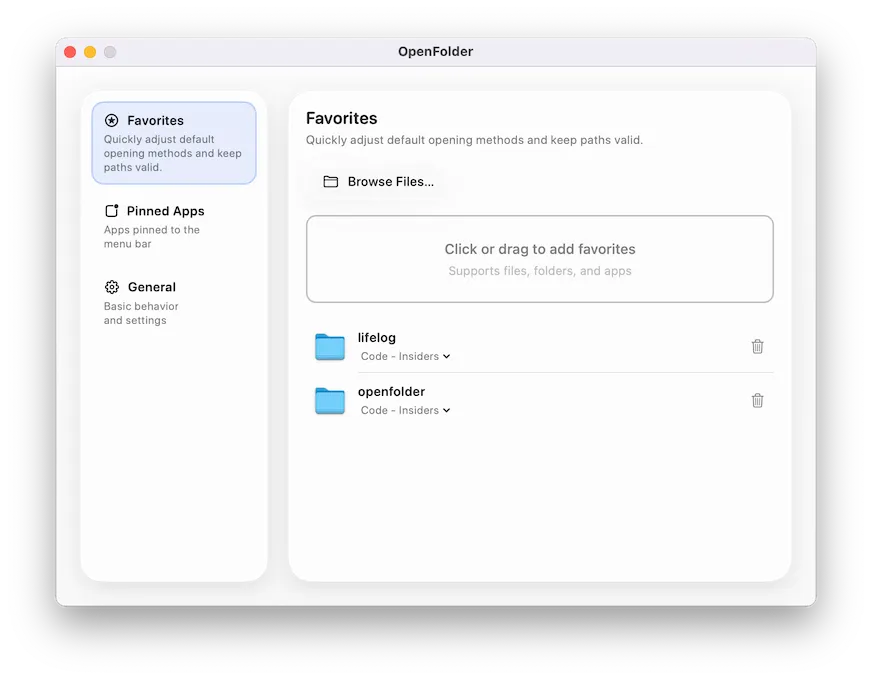
I recently noticed OpenFolder in the App Store after getting frustrated with constantly navigating through Finder windows to reach my frequently accessed project folders and applications. I’ve been working with this app for the past two weeks on my Mac Mini M4, and it has streamlined how I access the files and folders I need throughout the day.
The app lives in your menu bar and presents your favorite items in a floating glass-inspired panel. The first time I clicked the menu bar icon, I appreciated how clean and minimal the interface felt. Adding items is straightforward - just drag files, folders, volumes, or applications directly into the panel. I dropped in my current project folder, a few frequently used utilities, and my external drive mount point within minutes.
What makes OpenFolder practical is its simplicity. Everything you pin appears in the panel in the order you arrange them. Drag items around to reorder, click to open. The app also tracks recent launches, which has proven useful when I need to quickly access something I worked with earlier in the day but didn’t pin permanently.
The app offers a launch-at-login option, which I enabled after the first day of use. It starts quietly without notification and waits in the menu bar until needed. On my M4 Mac Mini running macOS 14.5, the app consumes minimal system resources and responds instantly when clicked.
OpenFolder is free to download with a Pro tier that unlocks unlimited favorites and pinned applications. The free version has limits that I hit within the first week, which led me to consider the Pro upgrade. Pricing options include $7.99 for lifetime access, $0.49 monthly, or $3.99 annually. If you downloaded the app before version 1.3.0, you receive complimentary Pro access, which is a generous gesture from developer Wang Shu.
The app requires macOS 14.0 or later and comes in at just 13.5 MB. It supports multiple languages including English, Japanese, Korean, and Chinese. According to the developer’s privacy policy, the app collects no data, which aligns with my preference for privacy-respecting utilities.
For comparison, there are alternatives like Alfred’s file navigation features or Raycast’s file search, both of which offer more comprehensive launcher capabilities. However, OpenFolder focuses specifically on providing a simple visual access point for your most important files and folders without the complexity of a full launcher system.
After two weeks of daily use, OpenFolder has reduced the time I spend hunting through Finder windows. The glass-inspired design fits well with macOS aesthetics, and the drag-and-drop approach removes any learning curve. For anyone who accesses the same files, folders, or applications repeatedly throughout their workday, this utility provides a straightforward solution worth considering.


