
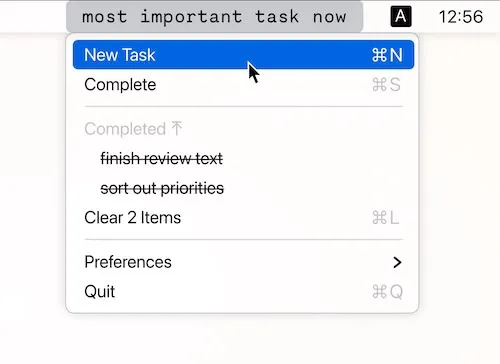
Redline takes a minimalist approach to task management by deliberately removing features found in conventional todo apps. Developer Ivan Danilov designed the app around a specific philosophy: productivity tools should focus on doing, not planning. The result strips away tags, folders, projects, priorities, deadlines, and search functionality.
The app displays a simple task list in the menu bar that remains visible, providing constant awareness of pending work. Users add tasks and work through them sequentially, without organizational features that often become distractions themselves.
Natural language parsing enables quick task entry. Typing “call dentist tomorrow 2pm” creates a task with the correct date and time without navigating date pickers. A global keyboard shortcut allows adding tasks without using the mouse, supporting uninterrupted workflow.
The design philosophy, outlined in Redline’s Manifesto, argues that modern productivity tools encourage “planning addiction” where organizing tasks creates a false sense of accomplishment. By removing organizational capabilities entirely, the app forces focus on task completion rather than task arrangement.
Requirements include macOS 10.15 Catalina or newer. The app integrates with system themes and maintains lightweight performance.
Available on the Mac App Store with straightforward pricing.
Limitations are intentional: no project management, team collaboration, time tracking, or sophisticated organization. The app serves personal task execution only, not complex project planning.
Alternatives include Things 3 (full-featured task management), Todoist (cross-platform with collaboration), and Apple Reminders (native integration).
Suitable for users who spend more time organizing tasks than completing them, programmers dealing with context switching, designers managing client work, or anyone seeking to break complex work into actionable items with constant visibility.


