I work in an environment where IT policies are restrictive. My organization blocks installation of most third-party applications, particularly those requesting accessibility permissions and keyboard monitoring access. This means popular window management tools like Rectangle, Magnet, and BetterSnapTool are off the table. When I discovered Squares, it solved this exact problem in an unexpectedly simple way.
Squares is a collection of AppleScripts for window positioning and resizing. It’s not a standalone application. Instead, it leverages macOS’s built-in Script Editor to provide window management through your menu bar. The entire project is transparent, auditable code that anyone can inspect. For organizations concerned about security compliance, this is exactly the kind of solution that passes muster.
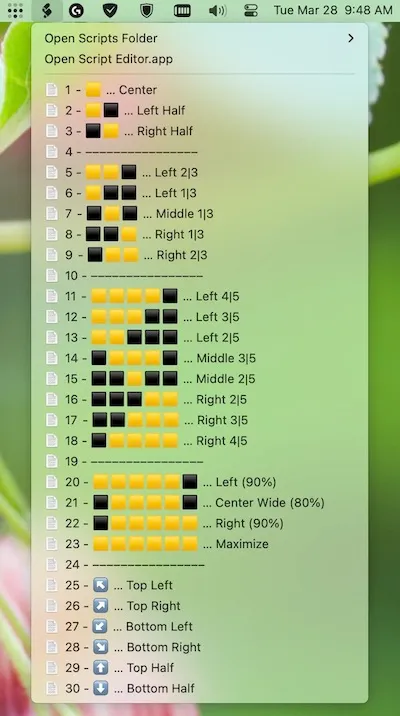
Installation requires a few manual steps. You enable Script Editor’s menu bar functionality in preferences, then copy the .scpt files into your User Scripts folder. Once configured, the scripts appear in your menu bar under the Script Editor icon. From there, you can snap windows to halves, quarters, and full screen positions without granting any special system permissions. The code is pure AppleScript using macOS’s native scripting capabilities.
I’ve been using Squares on my MacBook Pro for several weeks now. The functionality is basic but reliable. You get left half, right half, top half, bottom half, and quarter positioning options. There’s no fancy zone customization or window history features you might find in commercial alternatives. What you do get is window management that works within corporate security policies without requiring administrator approval.
The keyboard shortcut situation deserves mention. You can assign shortcuts through either Automator or the Shortcuts app, though both methods introduce slight execution delays. The developer acknowledges this limitation in the documentation without offering a workaround. In practice, the delay is noticeable but not deal-breaking. I find myself using menu bar access more often than keyboard shortcuts.
Squares works particularly well for anyone in a locked-down environment or users who prefer open-source solutions they can fully audit. The MIT license means you can modify the scripts to add custom positioning if the included options don’t match your workflow. I appreciate that the entire tool is about 100 lines of readable AppleScript rather than a complex binary application.
This is not the most feature-rich window manager available. If your Mac allows third-party installations and you want advanced features like window history, multiple monitor support with per-display zones, or zero-delay keyboard shortcuts, commercial alternatives will serve you better. But if you face installation restrictions, privacy concerns about accessibility permissions, or simply want a transparent solution you can completely understand and modify, Squares delivers exactly what it promises.
The project is actively maintained on GitHub with clear documentation. System requirements are minimal - any Mac running a modern version of macOS with Script Editor will work. Performance impact is essentially zero since you’re just running small scripts on demand rather than keeping a background process running constantly.
For users in restrictive corporate environments or anyone prioritizing software transparency and security compliance, Squares represents a practical solution to the window management problem. It works within system constraints rather than fighting against them.


