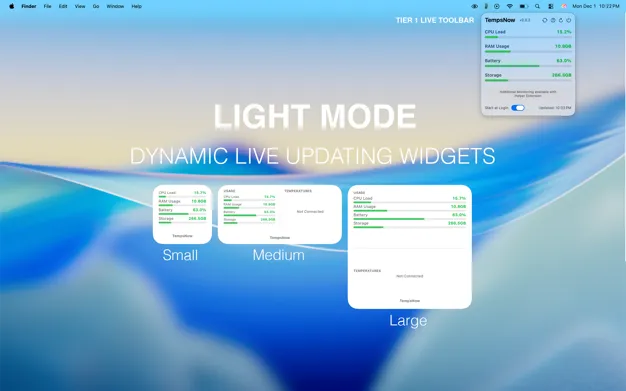
TempsNow displays real-time CPU and GPU temperatures in the Mac menu bar, providing immediate visibility into hardware thermal behavior during intensive workloads. The app tracks temperature changes during video exports, development builds, and other demanding tasks.
Key features include:
- Real-time menu bar temperature display for CPU and GPU
- Desktop widgets in small, medium, and large sizes with live updates
- Optional Apple-notarized system extension for advanced hardware metrics
- Optimized specifically for Apple Silicon with minimal resource impact
The app weighs 9.2 MB and runs continuously without noticeable performance impact. The system extension enables more accurate temperature readings across different components. The developer explicitly states no data collection occurs, maintaining complete privacy.
System requirements include macOS 14.0 or later. TempsNow costs $2.99 CAD on the App Store and supports Family Sharing for up to six members. Version 2.0.3 includes UI bug fixes and broader macOS 14.0+ availability.
Limitations include adding another icon to manage in crowded menu bars. Users can customize the display or use the widget alternative to keep the menu bar minimal. The app focuses specifically on temperature monitoring rather than comprehensive system statistics.
Alternatives include Stats (free, open-source) for broader system monitoring beyond temperatures, Macs Fan Control for combined temperature monitoring and fan speed adjustment, or iStatistica for comprehensive system monitoring with additional metrics.
Suitable for users who want immediate temperature visibility during intensive workloads, particularly creators, developers, and power users running video editing, compilation, or other demanding tasks who want to understand their Mac’s thermal behavior without complex system monitoring tools.