
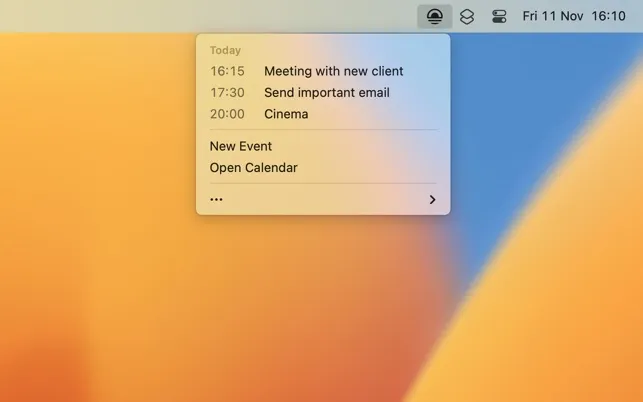
Today displays the current day’s calendar events in a clean menu bar dropdown, providing quick schedule access without opening a full calendar application. Developer Sindre Sorhus describes it as “an experiment to make the simplest calendar app possible.”
The app integrates with Calendar, Fantastical, and BusyCal, showing today’s schedule at a glance. It automatically detects video call links in calendar events, enabling one-click joining for Zoom, Teams, or Meet calls without hunting through calendar descriptions. Clicking any event opens it in the preferred calendar app.
Unlike comprehensive calendar apps that show multiple days, weeks, or months, Today focuses exclusively on current-day events. This approach eliminates visual clutter and feature bloat for users who simply need quick access to their immediate schedule.
Integration with macOS’s built-in Calendar means setup takes seconds with no account linking, data syncing, or configuration required. Today reads from whatever calendar services are already configured in Calendar.app, whether iCloud, Exchange, Google Calendar, or other supported services.
The app complements rather than replaces existing calendar workflows. It serves as a lightweight reference tool keeping daily schedules visible and accessible during work rather than attempting to be a full calendar management solution.
Today is completely free and available on the App Store for macOS 14 and newer. A non-App Store version supporting macOS 15 and newer is available directly from the developer’s website. The developer notes that users needing more advanced calendar features should consider Dato, his more full-featured calendar utility.
Limitations include the single-day focus, which may not suit users who need to see upcoming days or weeks. There is no calendar editing capability; users must open their calendar app for modifications.
Alternatives include Dato for comprehensive menu bar calendar management or Fantastical for full-featured calendar functionality. Suitable for users who want persistent daily schedule visibility without the overhead of checking a full calendar application.


