
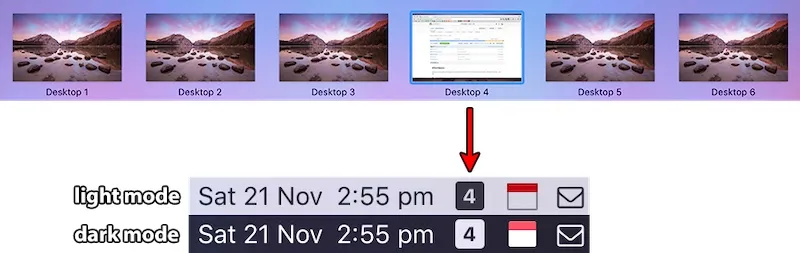
I use macOS Spaces extensively to organize my work across multiple virtual desktops - development on Space 1, communication tools on Space 2, research on Space 3. But there’s always been one frustrating problem: when switching between Spaces with keyboard shortcuts, I lose track of which one I’m actually on. Mission Control shows the layout, but that’s an extra step that interrupts my workflow.
WhichSpace solves this with admirable simplicity. It’s a menu bar app that displays a single number - the currently active Space. That’s it. No configuration panels, no feature creep, just a persistent reminder of your current virtual desktop position. For anyone juggling multiple Spaces throughout the day, this tiny piece of information eliminates a surprising amount of cognitive overhead.
I’ve been running WhichSpace on my Mac Mini with M4 and macOS 15.4, and it does exactly what it promises. The app sits quietly in the menu bar, updating instantly as I switch between Spaces using Control+1, Control+2, and so on. The response is immediate - there’s no lag or delay between switching Spaces and seeing the number update.
The implementation is remarkably lightweight. WhichSpace uses minimal system resources, consuming about 20-30MB of memory and negligible CPU. It starts automatically on login and requires accessibility permissions to monitor Space changes, which is standard for any app that needs to track workspace switching.
What I particularly appreciate is the developer’s focus. George Christou (gechr) created this tool to solve one specific problem and resisted the temptation to bolt on unnecessary features. The entire app is open source under the MIT license, with the code publicly available on GitHub. You can review exactly what it does before installing it, which matters for any utility that requires system-level permissions.
WhichSpace supports macOS 10.11 El Capitan and later, covering a wide range of Mac configurations. The installation is straightforward - download the release from GitHub, move it to your Applications folder, grant accessibility permissions when prompted, and you’re done. There’s no installer, no background services, no complexity.
The app doesn’t offer appearance customization - the number displays in whatever style matches your menu bar theme. Some users might want color coding or custom icons for different Spaces, but that would require configuration UI and increase complexity. The current implementation embraces minimalism in a way that feels intentional rather than incomplete.
For developers, system administrators, or anyone who lives in multiple Spaces, WhichSpace provides exactly the awareness needed without demanding attention. It’s particularly valuable when working with applications that switch Spaces automatically or when managing different contexts across your virtual desktops. The ability to glance up and immediately know your position prevents the disorientation that comes from rapid Space switching.
The open source nature means the community can contribute improvements if needed, though the simplicity of the current implementation suggests there isn’t much to add. Sometimes the best tools are the ones that do one thing exceptionally well, and WhichSpace achieves that without compromise.
This is the kind of utility that should probably be built into macOS. Apple shows Space numbers briefly when switching, but that information disappears immediately. WhichSpace makes it persistent, transforming a momentary notification into continuously available awareness. For users who depend on Spaces for workflow organization, that difference is significant.
If you’re managing multiple virtual desktops and find yourself occasionally confused about your current location, WhichSpace eliminates that confusion. It’s free, open source, lightweight, and solves a real problem that affects anyone using macOS Spaces seriously.


