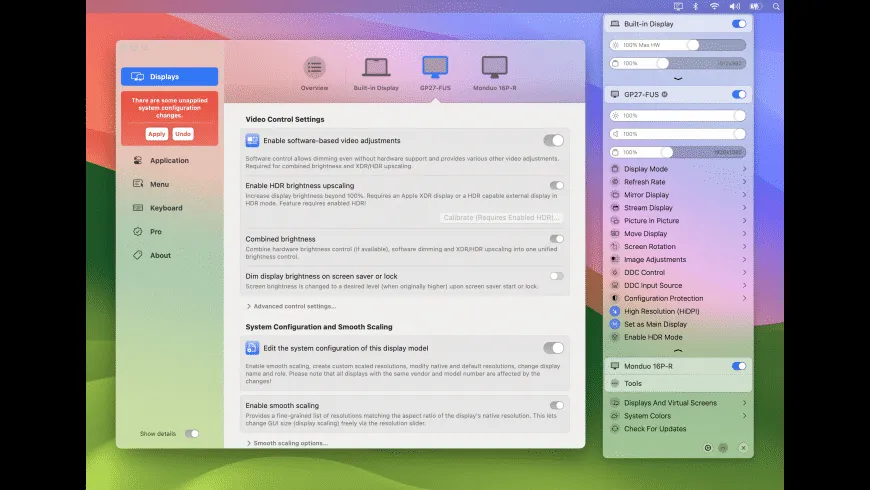
BetterDisplay provides comprehensive display management for macOS, addressing limitations in Apple’s native display scaling and control options. The app enables custom HiDPI resolutions, hardware brightness control via DDC, and virtual display creation from a single menu bar interface.
The core feature is custom resolution scaling. Unlike macOS’s limited default options, BetterDisplay allows precise HiDPI scaling for external monitors, enabling sharp text rendering at any desired UI size. This proves particularly valuable for 4K monitors where native macOS scaling often provides only two suboptimal choices.
Hardware brightness control uses DDC (Display Data Channel) to communicate directly with external monitors. Users can adjust brightness via keyboard shortcuts (Command+F1/F2), eliminating the need to access physical monitor buttons. This functionality works with most DDC-compatible displays from manufacturers including Dell, LG, and BenQ.
Virtual display functionality creates additional screen space without physical hardware. Users can configure dummy displays for window organization, then use Mission Control to switch between virtual and physical screens. The Picture-in-Picture feature floats a live view of any display in a resizable window, useful for monitoring secondary screens during video calls.
System requirements: macOS 13.2 or newer. Available via Homebrew (brew install --cask betterdisplay) or direct download from GitHub.
Pricing: Free version with basic scaling features; Pro version ($19.99, one-time) unlocks full functionality including advanced DDC controls and virtual displays. 14-day trial available.
Limitations: XDR brightness boosting requires newer Macs with compatible displays (Apple Studio Display, Pro Display XDR). DDC compatibility varies by monitor manufacturer and connection type. Requires Accessibility permissions.
Alternatives: MonitorControl (free, open-source, DDC brightness only), Lunar (subscription-based, similar feature set).
Suitable for users who connect external monitors to their Mac and need precise scaling control, keyboard-based brightness adjustment, or virtual display capabilities beyond what macOS provides natively.