
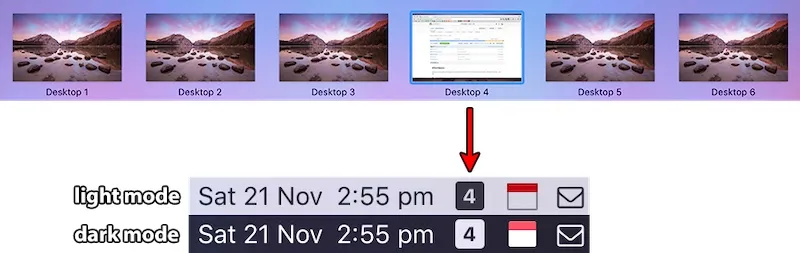
WhichSpace displays the current macOS Space in the menu bar and can switch virtual desktops from that same control. (Free, open-source)
The icon can show only the active Space or every Space at once. Inactive Spaces are dimmed; empty Spaces and fullscreen apps can be hidden. Clicking a Space jumps to it. Scrolling over the icon cycles Spaces. The frontmost window can be sent to another Space without opening Mission Control.
Appearance is configurable per Space: foreground and background colors, icon shapes, custom labels, SF Symbols, emojis, badges, and fonts. Global keybinds switch to a chosen Space. Optional sound plays on a switch. The app also exposes Shortcuts actions, AppleScript, and whichspace:// URLs for automation, and it can launch at login with automatic updates.
On multiple displays, every display’s Spaces can be packed into the one menu bar extra, with a divider between displays. Fullscreen apps appear as their app icon (or F).
System requirements: macOS 14 Sonoma or later. Apple Silicon and Intel. Install via Homebrew (brew install --cask whichspace) or WhichSpace.zip from GitHub Releases.
Pricing: (Free, open-source) MIT license.
Limitations: macOS 14+ excludes older systems. One menu bar extra is mirrored across displays, so each monitor cannot show a unique Space number. Switching and window-move features depend on macOS Space APIs and may lag when Mission Control is in use.
Alternatives: Spaceman (free, open-source, numbered or named Spaces in the menu bar). macOS Mission Control (visual overview, no persistent menu bar indicator). CurrentKey (paid, Space names and assignment).
Suitable for users who keep several Spaces open and want a persistent, clickable indicator rather than the system flash that disappears after a shortcut.


